
Policy Acknowledgement
Assign policies, track deadlines and check employee acknowledgements for each published version.
- Nov 2026
- v26.11.2
Policy Acknowledgement shows who has acknowledged a specific version of a company policy. Owners publish policies in SharePoint Online and assign them to a selected audience. Employees see their deadlines, read the policy and submit their acknowledgement in SharePoint or through the My Policies personal app in Microsoft Teams.
- Documents, SharePoint pages and external links
- Published version history
- Audience preview by Microsoft Entra ID group and employee attributes
- Personal assignments in SharePoint and Teams
- Receipts with the version and acknowledgement statement
- Team reports and log integrity checks
Overview
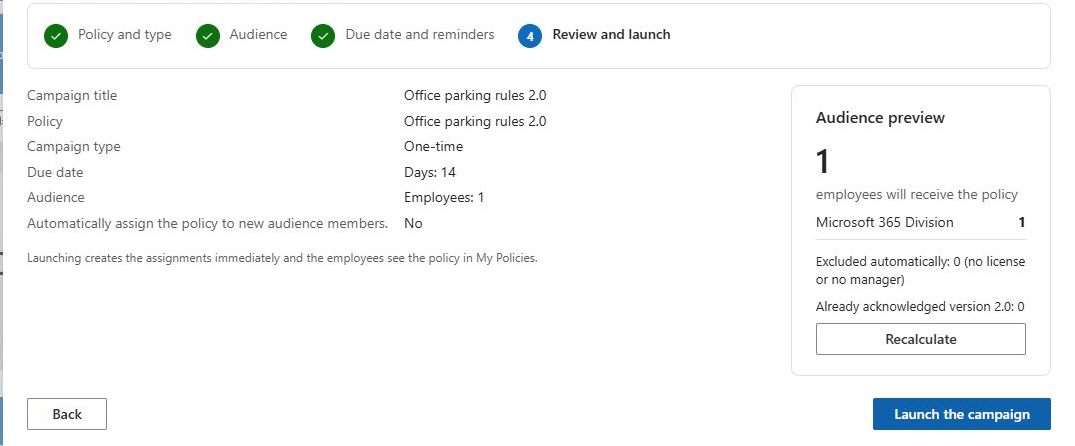
Publish a version and choose its audience
When a safety procedure changes, its owner can publish the revised version and create a campaign for the affected department. The owner previews the recipients, checks individual exclusions and sets a deadline. Launching the campaign creates the employee assignments.
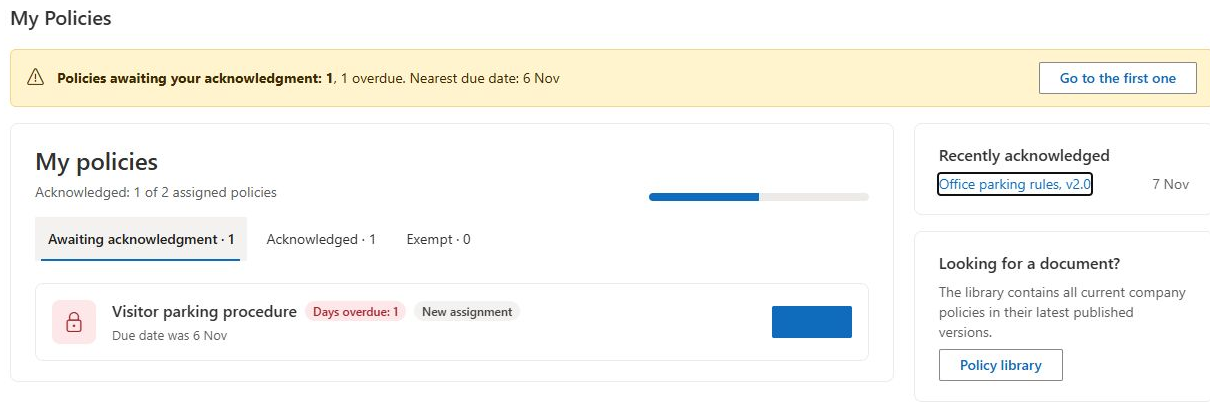
Read and acknowledge an assignment
In My Policies, an employee opens the assigned version, reads the procedure and accepts the statement set by the owner. Employees who need clarification can ask a question or explain why they cannot acknowledge the policy.
Knowledge Base
Read articles related to Policy Acknowledgement
Policy Acknowledgement Data Storage: Direct and Service Modes
Understand policy hub storage, acknowledgement recording modes, permission synchronization and evidence-protection limitations.
Troubleshooting Failed Acknowledgements and Missing Notifications
Investigate acknowledgement save errors and missing emails by distinguishing direct and service writes, partial saves, manual reminders and external notification jobs.

How to View Previous Policy Acknowledgements and Receipts
Find completed assignments, inspect recorded policy receipts and understand the difference between a receipt, a carried assignment and a document snapshot.
Compliance Dashboard: How to Analyze Policy Acknowledgement
Use compliance indicators, department filters, historical dates, policy matrices and Excel export to analyze policy assignments.
How to Send Manual Policy Reminders to Your Team
Send overdue-policy email reminders from Team Compliance, verify the sender and links, and handle partial delivery without duplicate mass retries.
Policy Acknowledgement: Solution Overview
Understand policy publication, employee assignments, version-aware acknowledgements, management reports and deployment considerations in Policy Acknowledgement.
Customer Questions
Some common questions about Policy Acknowledgement
Where can I find the policies I need to read?
Open My policies in SharePoint or Microsoft Teams to see your assignments and their due dates. Select a policy to read it and confirm that you have read the assigned version.
How do I assign a policy to a department?
Create a campaign for the published policy. Select a Microsoft Entra ID group or set an audience rule using the department attribute. Set the deadline and review the audience before launching the campaign.
How can I tell which version I acknowledged?
After you submit your acknowledgement, the receipt shows the policy title, version number, date and time, and the exact statement you confirmed.
What if I cannot acknowledge a policy?
Use the link below the acknowledgement button and enter your reason. The assignment is marked for review so the policy management team can follow up.
How can I see who missed the deadline?
Open the compliance dashboard, select the reporting date and filter by policy or department. Export the assignment details to Excel and filter the status column for overdue assignments.
Reviews
No reviews yet
Supported Languages
Platforms
Recent Changes
- v26.11.2 #
🚀 New Features
- Authors can publish new policy versions with a summary of what changed.
- Campaign managers can assign policies to selected groups and set a deadline for acknowledgement.
- Employees can see their assigned policies and due dates in SharePoint or Microsoft Teams.
- When employees confirm that they have read a policy, the acknowledgement records which version they read.
- The compliance dashboard shows acknowledgement rates by policy and department and lets users export assignment details to Excel.
Available in bundles
Get this product together with others and save.
Knowledge & Compliance Pack
Vitextra 365 All Access
Discover more apps
Suggested apps
Share
Send feedback
We would love to hear from you! Please take a moment to let us know about your experience.