Since October 2026, all Vitextra products for Microsoft 365 use one versioning scheme based on the build date. This article explains the format, shows where to find the version of an installed product, and lists the last version of every product under the previous numbering together with its first version under the new one.
Version format
A version number consists of three parts separated by dots: year.month.build.
| Part | Meaning | Example (26.10.5) |
|---|---|---|
| Year | The last two digits of the year the build was made | 26 → 2026 |
| Month | The month of the build, without a leading zero (1–12) | 10 → October |
| Build | The sequence number of the build within that month, starting from 1 | 5 → fifth build in October 2026 |
The version therefore tells you when the product was built: 26.10.5 is the fifth build of October 2026, 27.1.1 will be the first build of January 2027.
📝 Note
The build number is not reset between products — every product has its own counter. 26.10.5 of Employee Directory and 26.10.5 of RSS Reader are two unrelated builds that happen to be the fifth build of their respective product in the same month.
Comparing versions
Compare the three parts as numbers, from left to right: first the year, then the month, then the build. A later date is always a newer version.
- 26.10.13 is newer than 26.10.5 (same month, a later build)
- 26.11.1 is newer than 26.10.13 (a later month)
- 27.1.1 is newer than 26.12.9 (a later year)
❗ Important
Compare the parts as numbers, not as text. In a text comparison "26.10.13" sorts before "26.10.5" because "1" comes before "5", which is wrong. If you compare versions in scripts or in your own inventory, split the version by the dot and compare each part numerically.
Every version under the new scheme is numerically greater than any version under the previous product-specific numbering (the old major versions never exceeded 6), so "a bigger number is a newer version" holds across the transition as well.
Where to find the version
Download Center and changelog
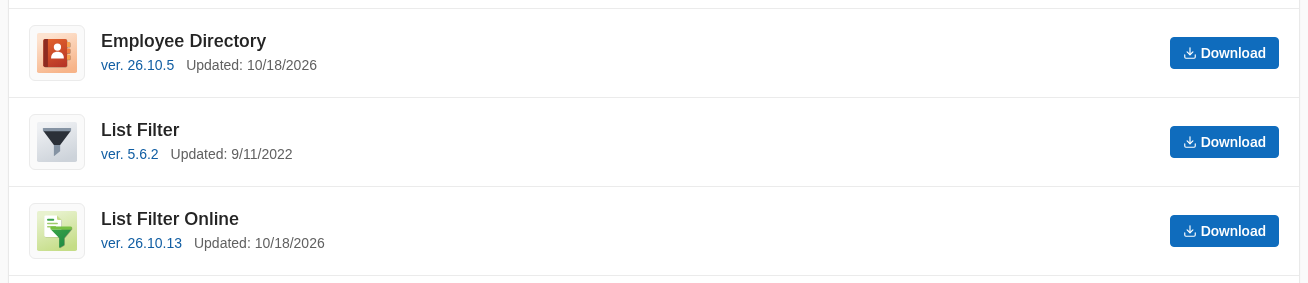
The Download Center shows the current version of every product next to the download link. The changelog page of each product lists every released version with its date.
Web part property pane
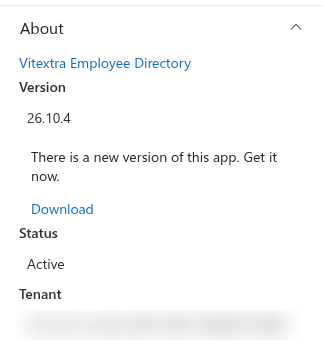
Open the page in edit mode, select the web part and open its property pane. The About section at the bottom of the pane shows the installed version of the product.
App Catalog
Tenant administrators can see the version of every deployed package in the Apps for SharePoint library of the tenant App Catalog: the App Version column shows the version of the uploaded package.
Microsoft AppSource
The product listing in Microsoft AppSource shows the version of the package published in the store. It can lag behind the Download Center by a few days while a new release goes through the Microsoft certification.
Old and new version numbers
The table lists the last version released under the previous numbering and the first version released under the new scheme for every product that has made the transition.
| Product | Last version (old numbering) | First version (new scheme) |
|---|---|---|
| Announcements Carousel | 1.2.1 | 26.10.5 |
| Employee Details | 1.0.x (releases were not numbered) | 26.10.4 |
| Employee Directory | 6.1.7 | 26.10.5 |
| List Filter Online | 3.6.2 | 26.10.13 |
| My Tasks | 6.3.6 | 26.10.13 |
| Organizational Chart | 2.3.6 | 26.10.7 |
| QR Code Generator | 1.2.7 | 26.10.5 |
| Questions & Answers | 4.2.2 | 26.10.6 |
| Quick Poll | 1.9.1 | 26.10.2 |
| RSS Reader | 3.6.2 | 26.10.5 |
| Smart Search | 3.1.1 | 26.10.9 |
| Smart Tiles | 3.5.4 | 26.10.4 |
📝 Note
Password Vault, Short URL Online and Stock Quotes still carry their previous version numbers (1.3.7, 4.0.3 and 1.0.3). They switch to the new scheme with their next release. All new products are released under the new scheme from their first version.
Products that are not affected
The scheme applies to products for Microsoft 365 only. The legacy products built for on-premises SharePoint Server keep their existing four-part version numbers:
- Document Auto Title (1.1.0.0)
- List Filter (5.6.2)
- Number Generator (1.4.2.0)
- Quick Filter (1.2.0.0)
- Short URL (3.4.4.0)
❗ Important
Do not compare the version of a SharePoint Server product with the version of a Microsoft 365 product. They are different products with different numbering, even when the names are similar — List Filter (SharePoint Server, 5.6.2) and List Filter Online (Microsoft 365, 26.10.13) are two separate products.
What changes for updates and licenses
Nothing. The new scheme changes only how versions are numbered:
- existing licenses remain valid and do not need to be re-activated;
- the update procedure is the same: download the latest package from the Download Center and upload it to the App Catalog, or let the tenant App Catalog update the app automatically where that is configured;
- the changelog of every product continues with the new numbers.
💡 Tip
For the deployment and update procedure, see the KB10035. Installing Cloud-based Product article.