Discussions
Overview
"Where do we put the forum?" is a question every intranet owner asks sooner or later: a place where employees ask, colleagues answer, and the answer can still be found a year later. Microsoft 365 offers several candidates, and they are not interchangeable. This article compares the four that come up in practice — the classic SharePoint Discussion Board, Viva Engage communities, Microsoft Teams channels and the Vitextra Discussions web part — on the criteria that decide the choice: where the forum lives, who may read and post, how replies are organized, how people are notified, and what it costs.
📝 Note
The statements about Microsoft features reflect Microsoft's documentation and Message Center announcements as of October 2026. Microsoft changes Viva Engage and Teams regularly; check the current documentation for details.
The options in brief
The classic SharePoint Discussion Board. The list template that SharePoint has shipped since the 2000s: a discussion is a folder, replies are items inside it, with threaded and flat views, a Question flag and a Best reply. It exists only in the classic experience.
Viva Engage. The enterprise social network of Microsoft 365. A community is a Microsoft 365 group with a feed of conversations, questions with a marked best answer, and — in the paid Answers experience — a company-wide question hub. A SharePoint page can show a community feed through the Viva Engage web parts.
Microsoft Teams channels. Channel posts with replies, since October 2025 also with threads. Conversations live in the team, where the day-to-day chat happens.
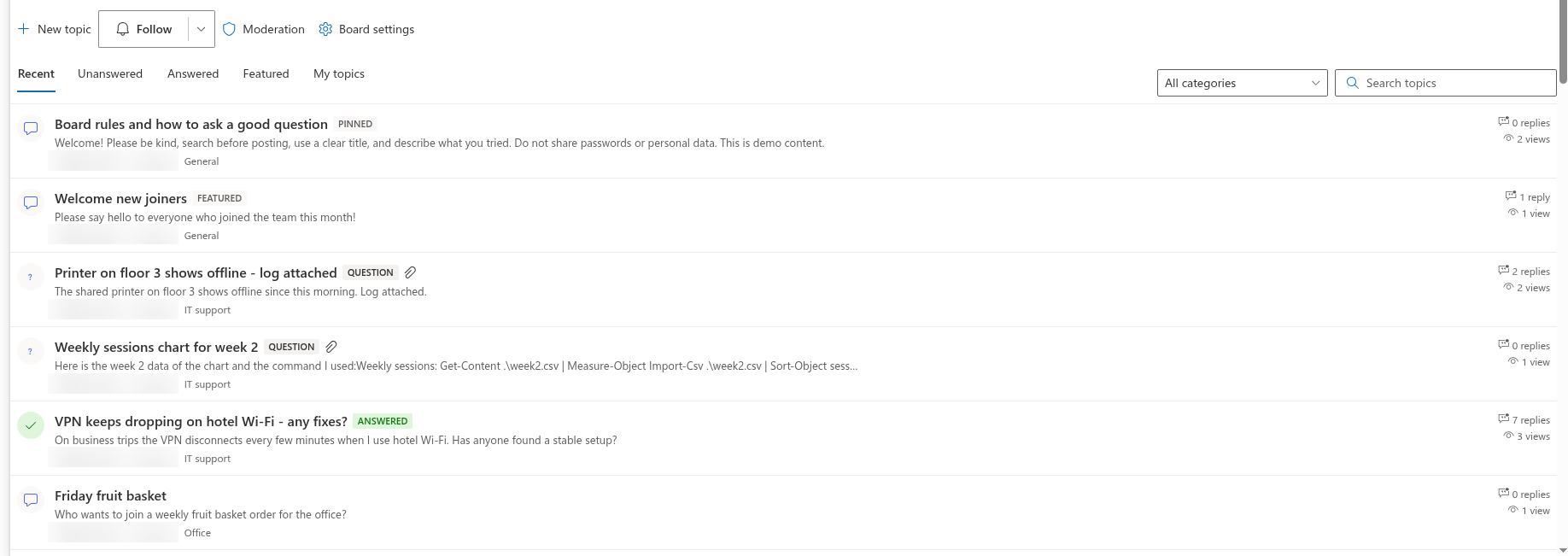
Vitextra Discussions. An SPFx web part that puts a forum on a modern SharePoint page or into a Teams tab: boards with categories, topics and questions, threaded replies, best answer, follow subscriptions, moderation and an importer for classic boards. Everything is stored in lists on the site itself.
Where the classic Discussion Board stands
A lot of advice on the web says that Microsoft has "removed" the Discussion Board. That is not accurate, and it matters for planning. As of October 2026, Microsoft has not formally retired the Discussion Board list template. Its actual status is this:
- The template is hidden from the modern New menu and is created only through the classic experience (or PowerShell). On communication sites it appears only after the Team Collaboration Lists feature is activated.
- It is classic-only: there is no modern web part for it, it cannot be placed on a modern page, and it does not open in Microsoft Teams.
- It is not developed: the user interface, views and forms have not changed in years, and Microsoft's own page-modernization guidance lists the Discussion Board as a web part that "could not be mapped".
Two dated changes around it are what you should plan for:
| Change | Date | Effect on a classic board |
|---|---|---|
| Retirement of SharePoint Alerts (MC1072889) | Creation of new alerts switched off gradually from January 2026; the ability to use alerts removed from July 2026 | The only built-in notification mechanism of the classic board — Alert me on a discussion or a list — stops working |
| Classic user-created pages become read-only (MC1464926) | 1 October 2028 | The classic pages that host discussion boards can no longer be edited. Microsoft states that classic list views and list forms are not in the scope of this change and "might be addressed on a separate timeline" |
❗ Important
A classic board keeps working for now, but without alerts, without a modern or Teams experience and without a roadmap. If a forum is part of your intranet plans, treat the classic board as content to migrate rather than a platform to build on.
Side-by-side comparison
| Criterion | Classic Discussion Board | Viva Engage | Teams channel | Discussions |
|---|---|---|---|---|
| Lives on a modern SharePoint page | No (classic pages or an iframe) | A feed of a community through the Viva Engage web parts; a specific conversation cannot be chosen | No web part embeds a live channel | Yes — any modern page, full-page app, Teams tab and personal app |
| Who may read and post | Site permissions | Members of the community (a Microsoft 365 group); a public community grants its site access to Everyone except external users | Members of the team | Site permissions: readers read, members post, users with Manage Lists moderate |
| Guests | By site permissions | The External users feature was retired on 1 October 2024 | Guests of the team | By site permissions, no extra setup |
| Reply hierarchy | Threaded (folder + items) | Two levels in questions and conversations | Replies; threads since October 2025 | Unlimited nesting with reply-to-reply |
| Question, best answer, unanswered list | Question flag and Best reply; Unanswered view cannot be set as default | Questions with a best answer; Answers requires the Viva Suite | No (Q&A exists only in meetings) | Question topics, Mark as answer by the author or a moderator, Unanswered and Answered views, default view configurable |
| Notifications | SharePoint Alerts (retired July 2026) | In-app, e-mail and Teams notifications | Teams activity | Follow a board or a topic (Immediately, Daily digest, Weekly digest) and @mentions; e-mail delivery through a Power Automate flow built on the subscriptions list |
| Moderation | No pre-approval; editing others' replies needs the Design level | Community admins, reporting | Team owners | Require approval of new posts per board, moderation queue, Report, pin, feature, lock |
| Categories and views | Categories on community sites; views cannot be edited in the browser | Topics (tags) | Channels | Categories per board; Recent, Unanswered, Answered, Featured, My topics; search by title |
| Where the content is stored | A list on the site | The Viva Engage service (Microsoft 365 group) | A hidden folder of the group mailbox, files in the team's site | Five lists on the site: boards, topics, posts, subscriptions and an assets library |
| Microsoft Purview | Everything the site has | eDiscovery and retention; sensitivity labels and DLP not supported for content (container labels for communities since 2026) | Teams retention policies | Everything the site has: retention labels, eDiscovery of list items, audit, site sensitivity label |
| Availability | Wherever classic SharePoint Online is available | Not available in GCC High and DoD; Engage in Teams not available for EDU tenants | Included in Microsoft 365 | Wherever SharePoint Online modern pages and SPFx are available; no Viva or Teams license needed |
| Migration of an existing classic board | — | No importer | No importer | Built-in importer: topics, reply hierarchy, best answers, likes and attachments |
| Price | Included | Core features in enterprise plans; Answers with the Viva Suite | Included | Flat per tenant, Standard and Plus plans, 30-day trial |
When to choose which
Choose Viva Engage when you want a company-wide social network: storylines, campaigns, leadership Q&A, open communities that anyone in the organization can join. It is the right tool when the audience is "everyone" and the content is conversation rather than a structured knowledge base — provided it is enabled in your tenant and available in your cloud.
Choose a Teams channel when the discussion belongs to a working team and its daily chat: a project, a shift, a class team that already meets in Teams. Threads keep a conversation together, but there is no list of topics, no categories and no best answer, and the content stays in the team rather than on the intranet.
Keep the classic Discussion Board only as a temporary measure for an existing board whose readers still use classic pages. New boards should not be created on it: alerts are gone, modern pages and Teams are out of reach, and the classic pages that host it are on a published retirement timeline.
Choose Discussions when the forum belongs to a site — a department, a project, an extranet with guests, a course — and should look and behave like the rest of the modern intranet: on the page, in the site's permissions, in the site's Purview scope, and with a structured list of topics that remains searchable years later. It is also the practical option for tenants where Viva Engage is not available (EDU, GCC High, DoD) or is switched off by policy, and for organizations with live classic boards that need to be carried over without losing the reply threads.
Moving from the classic board
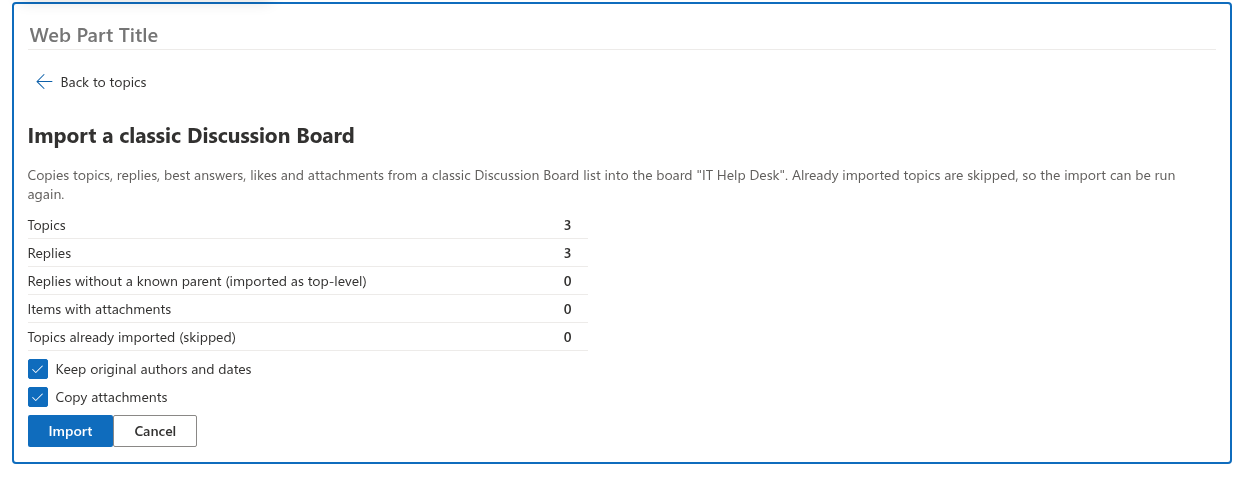
Discussions includes an importer for classic Discussion Boards (list template 108) on the same site or on another site of the tenant. A site owner opens the page in edit mode, chooses Import classic board, picks the source and runs an analysis first: the wizard reports how many topics and replies it found, how many replies lost their parent on a flattened board (they become top-level replies), how many items carry attachments and how many topics were imported earlier. The import then copies topics, replies with their hierarchy, best answers, likes and attachments; original authors and dates are restored when the account may set system fields. Imported items carry the id of the classic item, so the import can be re-run without duplicates.
💡 Tip
The step-by-step procedure is in KB10417. How to Import a Classic SharePoint Discussion Board into Discussions, and the field mapping in KB10418. What the Importer Copies and How It Rebuilds Reply Threads. Boards still on SharePoint Server are covered by KB10419. Migrating Discussion Boards from SharePoint Server to SharePoint Online with Discussions.
What Discussions does not try to be
Discussions is not a social network and not a chat. There are no storylines, no company-wide feed, no reputation points and no instant messaging. If you need those, Viva Engage and Teams remain the right tools — and a Discussions board can sit next to them, holding the structured, site-scoped knowledge that a feed tends to bury.