Discussions
Overview
A forum is only useful if people come back to it. Discussions lets every member decide how: follow a whole board to hear about every new topic, follow a single topic to hear about its replies, and choose for each subscription whether the news should arrive immediately, once a day or once a week. Authors are subscribed to their own topics automatically, and one click is enough to stop following anything.
Subscriptions replace the classic SharePoint Alerts that the old Discussion Board relied on — a mechanism that Microsoft is retiring in July 2026 and that never offered per-topic subscriptions or digests. The web part keeps the subscriptions in a list on your site; the email itself is sent by a Power Automate flow configured by the site owner.
The Follow button
The Follow button with a bell icon appears in two places:
- in the command bar of the board, next to New topic — this follows the board;
- in the header of an open topic, next to Back to topics — this follows that topic.
The button is a split button. Clicking its main part follows the board or topic with the Immediately frequency; clicking the arrow opens a menu with the three frequencies and Unfollow.
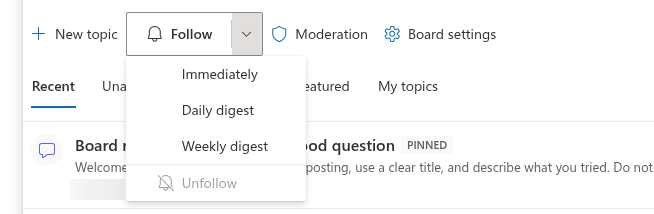
Once you follow, the button changes to Following with a filled bell and shows the chosen frequency — for example Following · Daily digest. From then on:
- clicking the main part of the button unfollows;
- picking another frequency in the menu changes it in place, without creating a second subscription;
- Unfollow in the menu does the same as the main button.
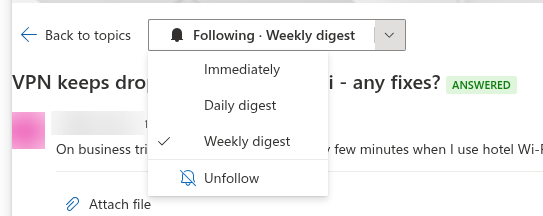
The button is shown to users who can post on the board (the Add items permission); readers cannot follow. It is hidden when the Discussions Subscriptions list is missing on the site — see Where subscriptions are stored.
Frequencies
| Frequency | What you receive |
|---|---|
| Immediately | One email for each event, sent when it happens |
| Daily digest | One email per day summarizing the items that had activity during the day |
| Weekly digest | One email per week summarizing the items that had activity during the week |
The frequency belongs to each subscription separately: you can follow the board weekly and a hot topic immediately. There is no global "mute" switch — to stop all emails from a board, unfollow the board and the topics you follow in it. Mentions are independent of all of this: a person who is @mentioned is notified regardless of their subscriptions (see KB10403. Using @Mentions in Discussions).
Automatic subscriptions
When you create a topic, the web part subscribes you to it with the Immediately frequency, so you learn about answers to your own question without doing anything. Open the topic and use the Following button to switch to a digest or to unfollow. Replying to a topic does not subscribe you to it; follow it explicitly if you want to see how the thread continues.
📝 Note
Topics imported from a classic Discussion Board do not receive automatic subscriptions, and classic SharePoint alerts on the old list are not converted. Ask the members of a migrated board to follow it once; the alerts on the old list can then be removed.
What each subscription delivers
The notification contract of Discussions defines which subscribers are addressed by which event:
| Event | Who is notified |
|---|---|
| A new topic is published on the board (or approved by a moderator) | Followers of the board |
| A new reply is published in a topic (or approved) | Followers of the topic and followers of the board; the author of the reply is skipped |
| A reply is marked as the best answer | The author of that reply and the followers of the topic |
| Somebody is @mentioned | The mentioned people, whatever they follow |
| A post is waiting for approval | The site owners |
Only approved content triggers notifications: on a board that requires approval, a topic or reply is announced when the moderator approves it, not when it is submitted. Each email links to the topic through the ?topic=<Id> parameter of the page that hosts the web part, so the recipient lands directly in the thread — see KB10407. Sharing a Link to a Topic in Discussions (Deep Links).
❗ Important
The web part records subscriptions and mentions; it does not send email itself and requests no mail permissions. Delivery is the job of a Power Automate flow that the site owner deploys on the site. The flow template is not shipped with the 26.10.2 preview yet: subscriptions you make today are stored and will be honoured as soon as the flow is in place, but no email arrives until then. The contract the flow implements is described in KB10414. How Notifications Work in Discussions: Subscriptions, Mentions and Power Automate.
Where subscriptions are stored
Every subscription is one item in the Discussions Subscriptions list of the site — one row per user and per followed object:
| Column | Content |
|---|---|
| User | The follower |
| Target type | Board or Topic |
| Target id | The id of the board in Discussions Boards or of the topic in Discussions Topics |
| Frequency | Immediate, Daily or Weekly |
| Board | A lookup to the board, so that the flow can read all subscriptions of one board in a single query |
Following creates the row, changing the frequency updates it and unfollowing deletes it. The list is created together with the other Discussions lists; on a site where the board was set up by the first preview build, a site owner adds it by opening the page in edit mode once. Like all Discussions lists it inherits the permissions of the site, so members can technically open it in Site contents and see who follows what; a site owner who prefers to keep that private can give the list unique permissions — the web part reads and writes it in the name of the current user and only needs that user to add, edit and delete their own rows.
💡 Tip
A subscription is the lightest way to keep a community alive: suggest the Weekly digest to occasional members and Immediately to the experts who answer. The data model behind all five lists is documented in KB10426. Discussions Lists and Columns Reference; where the data lives and what never leaves the tenant is in KB10411. Where Discussions Stores Your Data: Lists, Columns and Privacy.