Discussions
Overview
Every topic in Discussions carries three numbers: how many people liked it, how many times it was opened and how many replies it has received. Each reply carries a like counter of its own. The numbers are stored in the lists of your site next to the content, and the web part updates them in the browser of the person who likes, opens or replies. This article explains where each counter is shown, when it changes, who can influence it and why a number may occasionally lag behind — so that you know what the counters mean and what they do not.
Where the counters appear
| Place | What is shown |
|---|---|
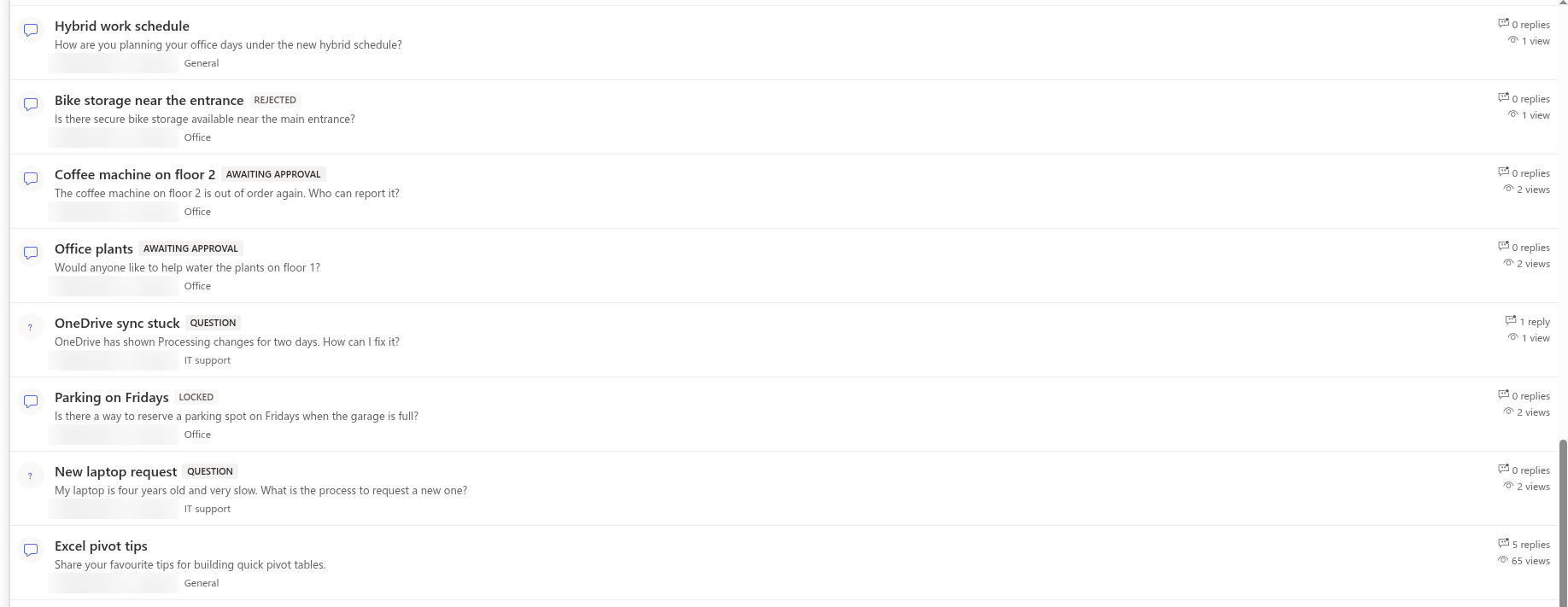
| Topic list | On the right of every row: N replies and N views. The column is shown when Show reply and view counters in the Appearance group of the property pane is on (the default). |
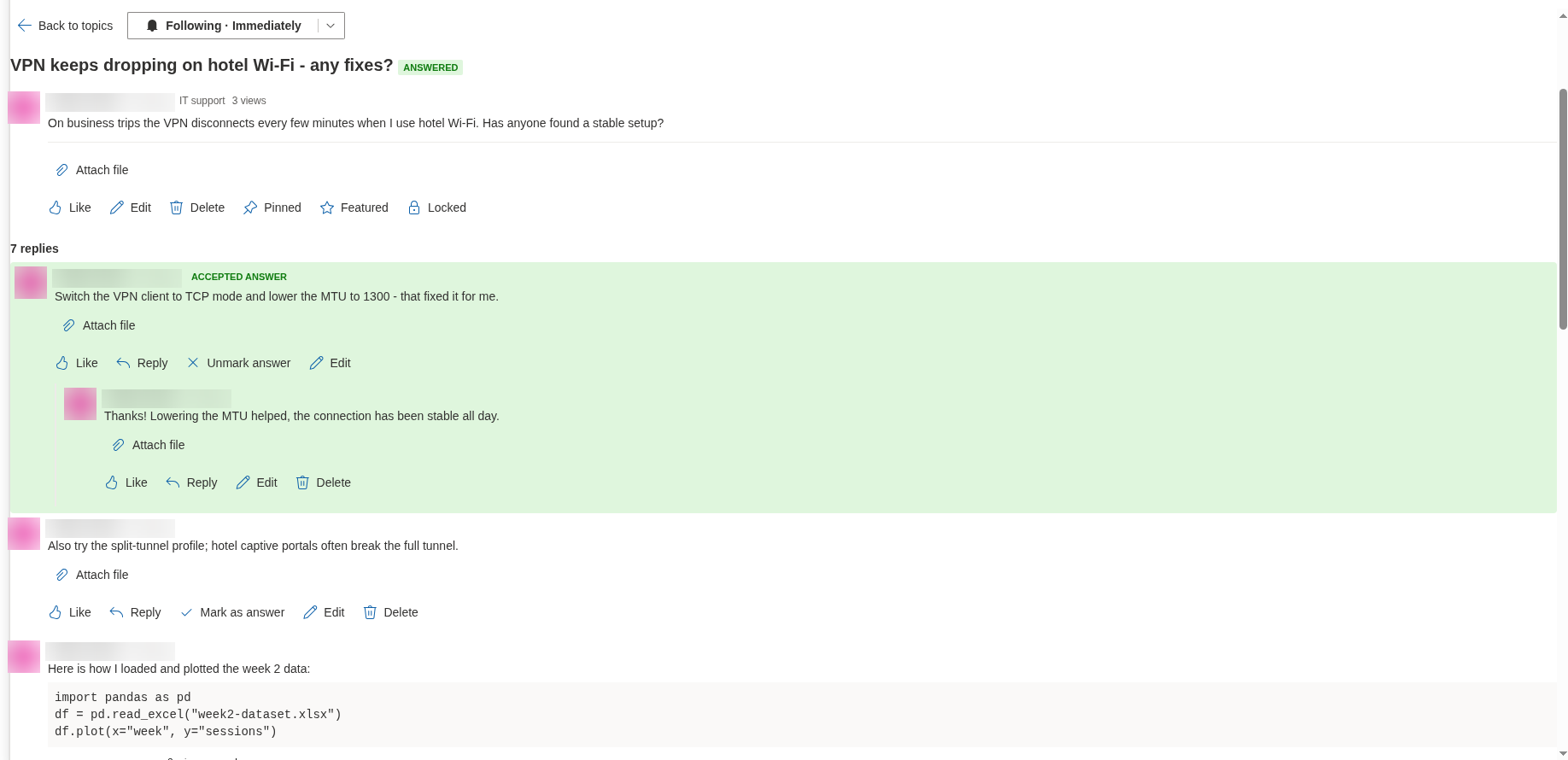
| Topic page | The line under the title shows the author, when the topic was created, its category and N views. The Like button of the topic shows its count as Like (3); the heading above the thread shows N replies. |
| Each reply | A Like button with the count of that reply. |
| Discussions Activity web part | N replies next to every topic in the feed. |
Likes are not shown in the topic list — only on the topic page and on the replies.
Likes
A like is a simple vote of appreciation for a topic or a reply.
- Who can like. Anyone who can post on the board — users with the Add items permission on the site (the Contribute and Edit levels). The web part does not stop you from liking your own post.
- How it works. Click Like under the topic or under a reply. The icon fills, the number next to the label increases by one and the button stays highlighted for you. Click Like again to take the like back. Each person can like an item once; there is no "dislike".
- What is stored. Two columns: Liked by (
VtxLikedBy), the list of people who liked the item, and Likes (VtxLikeCount), the number. Both are updated in one request when you click; the number is derived from the list of people at the moment of the click. - What likes do not do. Likes do not change the order of topics or replies, do not move a topic to the top of the Recent view and do not trigger notifications. The views of the topic list cannot be sorted by likes.
Views
The view counter tells how many times the topic page was opened in the web part.
- A view is counted once per browser session — the first time the topic is opened from the topic list, from a link with
?topic=(see KB10407. Sharing a Link to a Topic in Discussions (Deep Links)) or from the Discussions Activity web part. The counter is increased by one right after the topic has loaded. - The web part remembers the topics already opened in the session storage of the browser tab. Going back to the list and opening the same topic again, or refreshing the page, does not add a view; opening the topic in another tab or window, or after the browser was closed, counts again.
- Views are not de-duplicated per person beyond that: the same user opening a topic in two sessions adds two views, and the author's own visits count as well.
- A view is recorded only for users who are allowed to write to the lists. For a visitor with Read permission SharePoint refuses the update; the web part ignores the refusal silently and shows the topic as usual.
- The number is stored in the Views column (
VtxViewCount) of the topic.
📝 Note
Because views are recorded in the browser of the person opening the topic, the counter is an indicator of interest rather than an audit figure: readers without write permission are never counted, repeated visits in one session count once, and a visit that is interrupted before the topic has loaded is not counted either.
Replies
The reply counter of a topic counts all replies in the thread, at every level of nesting — a reply to a reply counts as much as a reply to the topic. The number is stored in the Replies column (VtxReplyCount) of the topic and changes as follows:
| Event | Effect on the counter |
|---|---|
| A reply is posted and is immediately approved (the board does not require approval, or the author is a moderator) | +1 |
| A reply is posted on a board that requires approval and waits for a moderator | no change — the reply is Awaiting approval and is not counted yet |
| A moderator approves a pending or rejected reply | +1 |
| A moderator rejects a pending reply | no change |
| A moderator rejects a reply that was already approved (from the Reported replies section of the queue) | −1 |
| An approved reply is deleted by its author or a moderator | −1 |
| A reply is edited | no change |
A moderator sees pending replies in the thread with the Awaiting approval badge, but the heading N replies counts only the approved ones. The author of a pending reply sees the reply as well, with the message Thank you. Your post will be visible after a moderator approves it.; a rejected reply likewise stays visible to its author, with the Rejected badge, and is not counted.
Last activity
Together with the reply counter, the web part records when the last reply was posted and who posted it: the Last activity (VtxLastActivity) and Last reply by (VtxLastReplyBy) columns. Last activity is set when the topic is created and is moved forward each time a reply is posted or approved. When a moderator approves a reply from the queue, Last reply by records the author of the reply, not the moderator. The Recent view sorts topics by this value, pinned topics first, so a topic rises to the top of the board whenever it receives an approved reply.
❗ Important
Likes, views, edits of the topic or of its replies and marking the best answer do not change Last activity. A topic that is being discussed through edits only stays where it is in the Recent view.
What readers see
Users who have only the Read permission on the site see every counter — replies, views and likes — exactly as everyone else, but cannot change them: the Like button is shown disabled, their visits are not counted as views and they cannot reply. Guests who were given access to the site follow the same rule according to their permission level. See KB10408. Permissions in Discussions: Who Can Read, Post and Moderate.
Why a counter may lag
The counters are stored as plain number columns and are updated by the browser of the person who acts, on a best-effort basis:
- When you post a reply, the reply is saved first and the counters of the topic are updated second. If the second request fails — a network problem, a lost session — the reply exists, but the counter and Last activity stay as they were. The web part never discards a reply because a counter could not be updated.
- Each update adds one to the value that was loaded when the page was opened. If two people reply or like at the same moment, one of the increments can be overwritten by the other.
- For likes, the Liked by column is the source of truth: it always lists exactly the people who liked the item, even when the number next to it is off by one.
- Boards imported from a classic SharePoint Discussion Board get their counters during the last phase of the import, Updating counters and answers; see KB10418. What the Importer Copies and How It Rebuilds Reply Threads.
A moderator can correct a number by opening the Discussions Topics list (the Open List link in the Board group of the property pane) and editing the item. How to diagnose a counter that looks wrong is described in KB10432. Counters, Last Activity or Best Answer Look Wrong.
💡 Tip
For reporting, do not rely on the denormalised columns: count the items of the Discussions Posts list grouped by the Topic lookup — in a list view, in Excel or in Power BI. That number is always exact.
Columns reference
| Counter | Column (display name) | Internal name | List |
|---|---|---|---|
| Likes of a topic | Likes, Liked by | VtxLikeCount, VtxLikedBy | Discussions Topics |
| Likes of a reply | Likes, Liked by | VtxLikeCount, VtxLikedBy | Discussions Posts |
| Views | Views | VtxViewCount | Discussions Topics |
| Replies | Replies | VtxReplyCount | Discussions Topics |
| Last activity | Last activity, Last reply by | VtxLastActivity, VtxLastReplyBy | Discussions Topics |
| Topics of a board | Topics | VtxTopicCount | Discussions Boards |
The board item carries one more counter, Topics: it is increased when a topic is created on the board and decreased when a topic is deleted from the web part, on the same best-effort basis as the others. The web part does not display it in this version.
All columns live in the lists of your own site; nothing is sent elsewhere — see KB10363. Where Vitextra Products Store Your Data: Privacy, Data Residency and GDPR. The full schema is in KB10426. Discussions Lists and Columns Reference.