Discussions
Overview
Discussions is a SharePoint Framework solution. Every board, topic, reply, like, report, subscription, attachment and image lives in ordinary SharePoint lists and a document library on the site where the web part runs, and every read and write is made through the SharePoint REST API with the identity of the signed-in user. Nothing is stored outside your Microsoft 365 tenant, and the package requests no Microsoft Graph permissions. This article describes the storage in the detail that a security review or a data protection assessment needs.
Summary for administrators
| Question | Answer |
|---|---|
| Where is the content stored? | In four lists and one document library on the site that hosts the board |
| Who creates them? | The web part, on first use, in the context of a user with the Manage Lists permission (site owners); missing lists and columns are added later in the same way |
| Can the lists be renamed? | Yes — the web part recognises them by fixed column ids, not by title |
| Where are attachments stored? | As attachments of the list items in Discussions Topics and Discussions Posts |
| Where are inline images stored? | In the Discussions Assets document library, in a folder per year |
| Whose identity is used? | The signed-in user, for every call |
| Which API permissions does the package request? | None; Microsoft Graph is not called |
| What is sent to Vitextra? | Technical identifiers for the license check and usage telemetry; no content |
| What happens to the data when the web part is removed? | Nothing — the lists stay on the site until you delete them |
The lists on the site
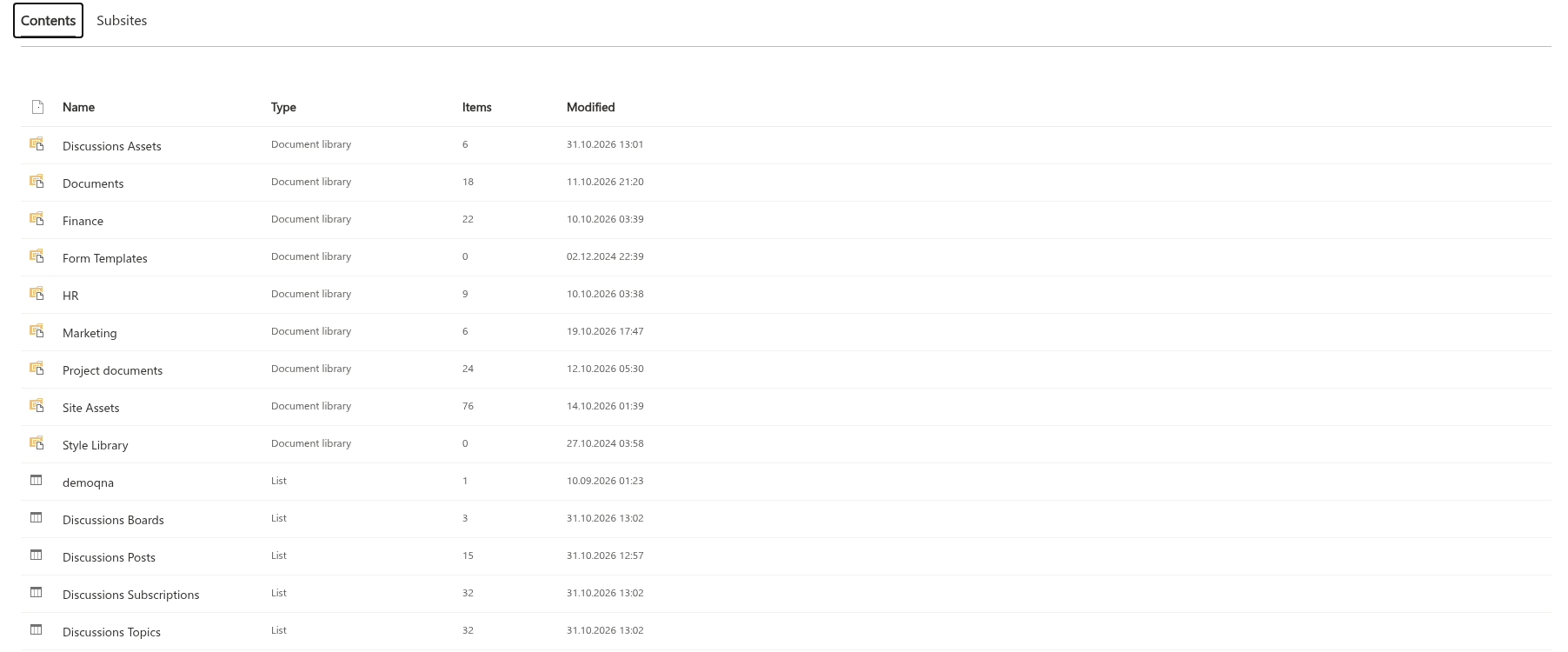
When a site owner creates the first board, the web part provisions the following lists at the site level. They serve every board on the site: a site can have several boards, and all of them share the same lists.
| Default title | Type | What it holds |
|---|---|---|
| Discussions Boards | Custom list | One item per board: title, description, mode (Discussion, QnA or Mixed), the list of categories, the topic counter and the Require approval setting |
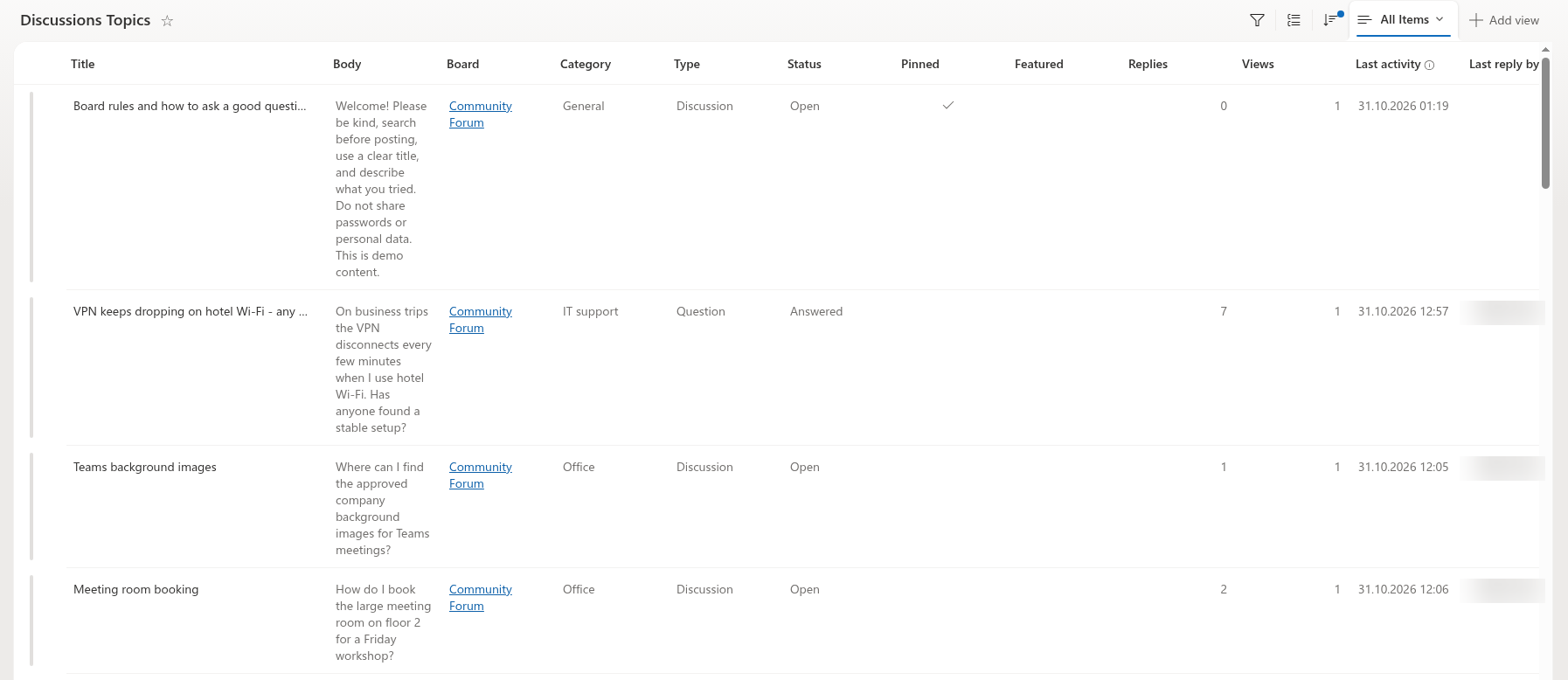
| Discussions Topics | Custom list | Topics: title, body, lookup to the board, category, type (Discussion or Question), status (Open, Answered, Locked), pinned and featured flags, counters, last activity, accepted answer, likes, approval status, mentions, reports, legacy id |
| Discussions Posts | Custom list | Replies: body, lookup to the topic, lookup to the parent reply, materialised path and depth, accepted-answer flag, likes, approval status, mentions, reports, legacy id |
| Discussions Subscriptions | Custom list | Who follows which board or topic and with which frequency |
| Discussions Assets | Document library | Images inserted into the rich text editor (pasted, dropped or uploaded) |
The lists are created visible in Site contents, with versioning enabled, content types disabled and quick (grid) editing disabled. The two content lists have item attachments enabled; the document library has folder creation enabled. The lists are crawlable, so topics and replies can appear in SharePoint search results like any list item.
The web part keeps the set of lists and columns up to date by itself. When a moderator (a user with the Manage Lists permission) opens a page whose web part was configured before the subscriptions list or the assets library existed, the missing lists and columns are created automatically. Board setup — Create board and Use board — also always checks the lists and adds the columns introduced by later versions, but only for users with Manage Lists; other users only look up the existing lists. Nothing is renamed or removed in the process.
📝 Note
The list titles are taken from the interface language of the person who creates the board. In an English interface the lists are called Discussions Boards, Discussions Topics, Discussions Posts, Discussions Subscriptions and Discussions Assets; in a Russian interface they receive the Russian titles from the product. The titles can be changed afterwards without breaking the web part.
How the lists are recognised
The web part does not depend on list titles. Every list carries a marker column with a fixed column id: the Mode column of the boards list, the Board lookup of the topics list, the Topic lookup of the posts list, the Target type column of the subscriptions list and a text column Discussions asset in the document library. The web part looks for the lists by title first and, when it does not find them, scans the visible lists of the site for the marker columns. Consequently:
- you may rename a list or change the display name of a column — the web part keeps working;
- you must not delete the marker columns or the other
Vtxcolumns — the web part would treat the list as missing or fail to read the items; - the lists must stay on the same site as the page that hosts the web part; a board cannot be served from another site.
The columns
All columns added by the product have internal names that start with Vtx; the display names are localized in the same way as the list titles. The complete reference, with types, indexes and the allowed values of the choice columns, is in KB10426. Discussions Lists and Columns Reference. The points that matter for a data review:
- Bodies of topics and replies (
VtxBody) are stored as HTML. The editor passes everything through an allow-list sanitizer before saving, and the web part sanitizes again before rendering, so a value edited directly in the list cannot inject scripts into the page. - People are standard SharePoint person columns: the author and editor of each item, the mentioned users (
VtxMentions), the users who liked (VtxLikedBy) or reported (VtxReportedBy) an item, the last person who replied (VtxLastReplyBy) and the subscriber (VtxUser). A person column references the site user information list, not a copy of the profile. - Moderation data is the approval status (
VtxApprovalStatus: Approved, Pending or Rejected), the report counter and the reporters. - Board settings (
VtxDescription,VtxMode,VtxCategories,VtxRequireApproval) and the board title are written by the Board settings command of the web part, which moderators open from the command bar; editing the item in the Discussions Boards list has the same effect. The categories are stored one per line. - Counters (
VtxReplyCount,VtxViewCount,VtxLikeCount,VtxTopicCount) are numbers updated by the web part; they can be corrected in the list. The view counter of a topic is increased at most once per browser session.VtxTopicCounton the board item is increased when a topic is created and decreased when a topic is deleted; both updates are best-effort, and the value is not shown in the web part. - Legacy id (
VtxLegacyId) keeps the identifier of the classic Discussion Board item an entry was imported from, so that the importer can be re-run without duplicates.
Attachments and inline images
Files that users attach to a topic or a reply are stored as item attachments of the corresponding list item in Discussions Topics or Discussions Posts — the standard SharePoint attachment folder of the item. They follow the permissions of the item and are deleted together with it.
Images inserted into the body of a post are uploaded to the Discussions Assets document library. The web part creates a folder named after the current year (2026, 2027, …) and saves the file there under a unique name made of a time stamp, a random suffix and the original file name, so that two users can upload screenshot.png without a conflict; the year folders keep the library under the list view threshold on busy sites. An image larger than 10 MB is rejected by the editor. The post references the image by its address in the library, so a reader needs read access to the library — inherited from the site — to see it.
When a topic or a reply is deleted in the web part (by its author or by a moderator, after a confirmation), the web part also deletes the inline images of the deleted text from Discussions Assets. Deleting a topic deletes all of its replies, the deepest ones first, then the topic, together with the images of all of them; a reply that still has nested replies cannot be deleted. The image cleanup is best-effort: only files of the Discussions Assets library are touched, an error does not stop the deletion, and an image that is removed from a post while the post is edited stays in the library.
❗ Important
Deleting a file from Discussions Assets does not change the post that references it: the post keeps the address and shows a broken image. Deleting a list item deletes its attachments with it. Both can be restored from the site recycle bin for the usual period.
What is stored on the page
The configuration of the web part is kept in the web part properties of the page, like for any SPFx web part: the selected board and its title, the ids and addresses of the lists, and the display options. The Discussions Activity web part stores the selected board, the address of the board page, the maximum number of items and the board-name switch. No content is cached in the browser or in local storage.
Identity and permissions
- Every request is a SharePoint REST call to the current site, made with the token of the signed-in user. SharePoint applies the permissions of that user to each call; the web part only decides which buttons to show (see KB10408. Permissions in Discussions: Who Can Read, Post and Moderate).
- The package requests no API permissions: nothing appears on the API access page of the SharePoint admin center and Microsoft Graph is never called. Details are in KB10413. API Permissions and Admin Consent for Discussions; the approval procedure in KB10360. How to Approve Microsoft Graph API Permissions for Vitextra Solutions in the SharePoint Admin Center is not needed for this product.
- The people picker behind @mentions uses the standard SharePoint people search of the site; a mentioned person is added to the site user information list if they were not there yet, which is the standard behaviour when a person column is filled.
- No e-mail is sent by the web part. Notifications are delivered by a Power Automate flow that the site owner sets up; see KB10414. How Notifications Work in Discussions: Subscriptions, Mentions and Power Automate.
What is sent outside the tenant
| Purpose | What is sent | Where |
|---|---|---|
| License check | The Tenant ID, the object ID of the user, the site address, the identifier, name and version of the product | vitextra.com |
| Usage telemetry | An event when the web part loads (product and version, site ID and address, the object ID of the user, the interface language, whether the web part runs in Teams) and technical details of errors | Azure Application Insights |
| Product files | An ordinary request for the scripts and icons of the web parts | static.vitextra.com, vitextra-storage.azureedge.net |
No board, topic, reply, attachment, image, subscription or mention is sent to Vitextra or to any third party. The picture across all Vitextra products, including the network addresses to allow, is in KB10363. Where Vitextra Products Store Your Data: Privacy, Data Residency and GDPR.
Lifecycle of the data
- Removing the web part from a page leaves the lists and their content untouched; add the web part again and pick the existing board to continue.
- Removing the package from the App Catalog or from the site disables the web parts but keeps the lists, which remain readable in the standard list views; see KB10362. How to Remove a Vitextra Solution from SharePoint Online and Microsoft Teams.
- Deleting the lists deletes the boards, topics, replies, subscriptions and files; they go to the site recycle bin.
- Retention, eDiscovery, auditing and sensitivity labels apply to the lists as to any other list of the site; see KB10412. Retention, eDiscovery and Sensitivity Labels for Discussions Content.
- Exporting is possible with the standard Export to Excel command of each list or with a Power Automate flow; the bodies are exported as HTML.