Discussions
Overview
Many SharePoint Framework solutions declare Microsoft Graph permissions that a tenant administrator has to approve on the API access page of the SharePoint admin center. Discussions is not one of them. The package declares no API permission requests, registers no application in Microsoft Entra ID and shows no consent prompt to users or administrators. Everything the web parts do — reading and writing boards, topics, replies, subscriptions, attachments and images, searching people for @mentions — goes through the SharePoint REST API of the site where the board lives, as the signed-in user.
This article states that fact for the security review, explains what an administrator does and does not see during installation, and lists the few things that do leave the tenant.
Summary for reviewers
| Question | Answer |
|---|---|
| Microsoft Graph permissions requested by the package? | None |
| Other API permissions (Azure DevOps, custom APIs)? | None |
| Entries on the API access page after deployment? | None — nothing to approve or reject |
| Microsoft Entra app registration or service principal of its own? | None |
| Admin consent or user consent prompts? | None |
| Identity used for data access? | The signed-in user, for every request |
| APIs called? | SharePoint REST API of the current site only |
| Application (app-only) permissions, service accounts, stored credentials? | None |
| Content sent to Vitextra or third parties? | None; only the license check and usage telemetry with technical identifiers |
| Custom script required on the site? | No |
What the solution calls
The web parts use the SharePoint Framework HTTP client, which sends every request with the identity of the current user. SharePoint applies the user's permissions to each call, exactly as it does for the list views in Site contents. The endpoints used are:
- Lists and list items of the current site — to find the Discussions lists by their marker columns, to create them on first use (Manage Lists is needed for that one operation), and to read and write boards, topics, replies, subscriptions, likes, reports and approval statuses.
- List item attachments — files attached to topics and replies.
- Files and folders of the
Discussions Assetsdocument library — inline images of the rich text editor. - The people picker service of SharePoint — the suggestions shown after you type
@, and resolving the chosen person to a site user. This is the same service the standard SharePoint people picker uses; it does not call Microsoft Graph. - The site's user information list — author names and the current user's id.
No request goes to Microsoft Graph, Exchange, Teams or any other Microsoft 365 service, and no e-mail is sent by the web part. The complete list of lists and columns is in KB10411. Where Discussions Stores Your Data: Lists, Columns and Privacy.
📝 Note
Because the user's own permissions apply, the web part cannot show anybody more than SharePoint would show them in the lists: readers see approved topics, moderators see pending ones, guests see what their site permissions allow. The role model is described in KB10408. Permissions in Discussions: Who Can Read, Post and Moderate.
What the administrator sees during installation
1. The package vitextra.discussions.sppkg is uploaded to the tenant App Catalog (or a site collection app catalog) and enabled with Enable app. The dialog lists the domain the scripts are loaded from and offers Add to all sites; it shows no permission section because the package declares none.
2. The API access page (SharePoint admin center → Advanced → API access) does not change: no request from Vitextra Discussions appears under Pending requests, and nothing has to be approved. If your organization keeps a record of approved API permissions, the entry for Discussions is simply "none requested".
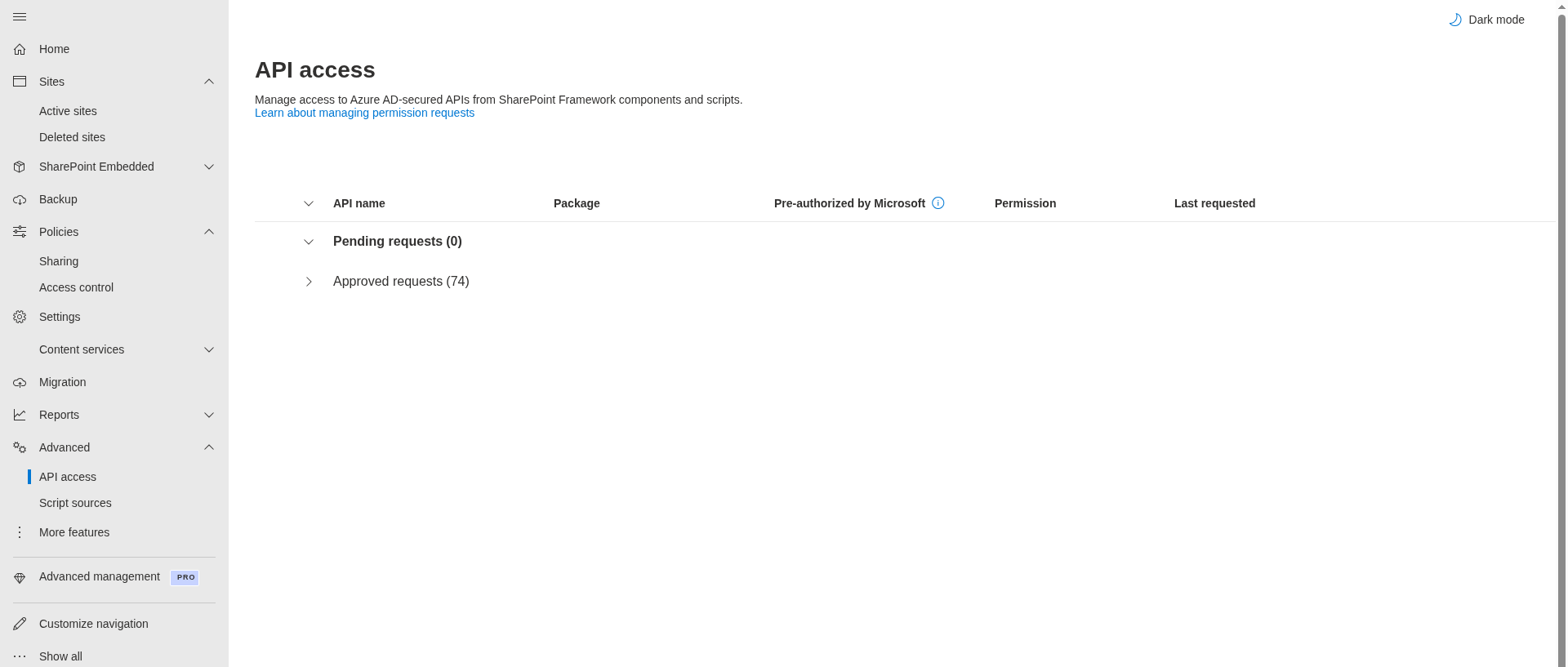
3. The web part is added to a page like any other, and the first user with Manage Lists creates the board. Users never see a consent dialog.
Installation and update steps are the same as for every Vitextra product: KB10035. How to Install a Vitextra Product in SharePoint Online, KB10050. How to Update a Vitextra SPFx Solution in SharePoint Online and KB10361. Tenant App Catalog vs. Site Collection App Catalog: Where to Deploy Vitextra Apps. The general procedure for packages that do request permissions is in KB10360. How to Approve Microsoft Graph API Permissions for Vitextra Solutions in the SharePoint Admin Center; for Discussions that article is not needed.
❗ Important
If a request from Vitextra Discussions ever appears on the API access page after an update, it comes from a new version that declares it, and the release notes of that version will say so. Version 26.10.2 declares none.
The Microsoft Teams app
The Teams app package that the App Catalog generates for the tab and the personal app declares no Microsoft Graph scopes either. Its manifest references only SharePoint Online itself — the standard mechanism by which an SPFx tab signs the user in to the team site — and the usual SharePoint and Microsoft 365 sign-in domains. In the Teams admin center the app therefore shows no API permissions to grant. How to add the app to Teams is described in KB10393. How to Add Discussions to Microsoft Teams.
What leaves the tenant
| Purpose | What is sent | Where |
|---|---|---|
| Product files | An ordinary browser request for the scripts and icons of the web parts | static.vitextra.com |
| License check | The Tenant ID, the object ID of the user, the site address and the identifier, name and version of the product | vitextra.com |
| Usage telemetry | An event when a web part loads (product and version, site ID and address, the object ID of the user, the interface language, whether it runs in Teams) and technical details of errors | Azure Application Insights |
No topic, reply, attachment, image, subscription or user list is sent to Vitextra or to any third party. The overview across Vitextra products, including data residency and GDPR, is in KB10363. Where Vitextra Products Store Your Data: Privacy, Data Residency and GDPR.
Where the e-mail permission lives
Discussions deliberately does not send e-mail, so it does not need Mail.Send or an application permission to send on behalf of a mailbox. The web part maintains the Discussions Subscriptions list and the Mentions column; delivery is the job of a Power Automate flow that a site owner sets up in their own environment. That flow uses the connections of the person who creates it — the SharePoint connection to read the lists and the Office 365 Outlook (or shared mailbox) connection to send — and the consent for those connections is given in Power Automate, under the governance your organization already applies to flows. The contract between the lists and the flow is described in KB10414. How Notifications Work in Discussions: Subscriptions, Mentions and Power Automate.
💡 Tip
For the security questionnaire: "The solution is a SharePoint Framework package that declares no API permission requests, has no Entra ID application of its own, calls only the SharePoint REST API of the hosting site with the signed-in user's delegated identity, stores all content in lists of that site, and sends only license and telemetry identifiers to the vendor." Every statement can be verified in the App Catalog, on the API access page and in the browser's network trace.