Discussions
Overview
Discussions splits notifications into two parts. The web part records who wants to hear about what: it keeps a list of subscriptions, lets users follow a board or a topic with a chosen frequency and marks the people mentioned in a post. The delivery of e-mail is left to a Power Automate flow that the site owner runs in their own tenant. The web part itself never sends mail and never asks for the Mail.Send permission or any other Microsoft Graph permission; the data the flow needs is in ordinary SharePoint lists on the site.
This article describes that contract: what the web part guarantees in the lists, and what a flow has to do with it.
❗ Important
In version 26.10.2 the Power Automate flow template is not shipped. The web part saves subscriptions and mentions as described below, but no e-mail is sent until a flow exists in your tenant. The contract in this article is what such a flow is built on; a ready-to-import template and its setup article are planned for a later release.
What the web part does
Following a board or a topic
Users who can post (the Add Items permission on the site, included in Contribute and Edit) see a Follow button in the command bar of the board and in the header of every topic. One click follows with the frequency Immediately; the drop-down part of the button offers Immediately, Daily digest and Weekly digest, and Unfollow. When a user follows, the button reads Following with the selected frequency. The author of a new topic is subscribed to it automatically with Immediately. Read-only visitors have no button, because they cannot write to the subscriptions list.
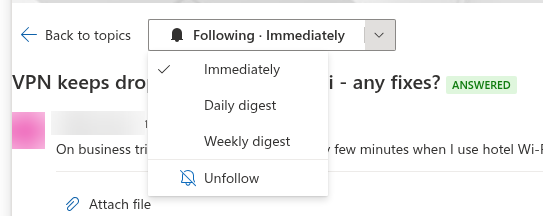
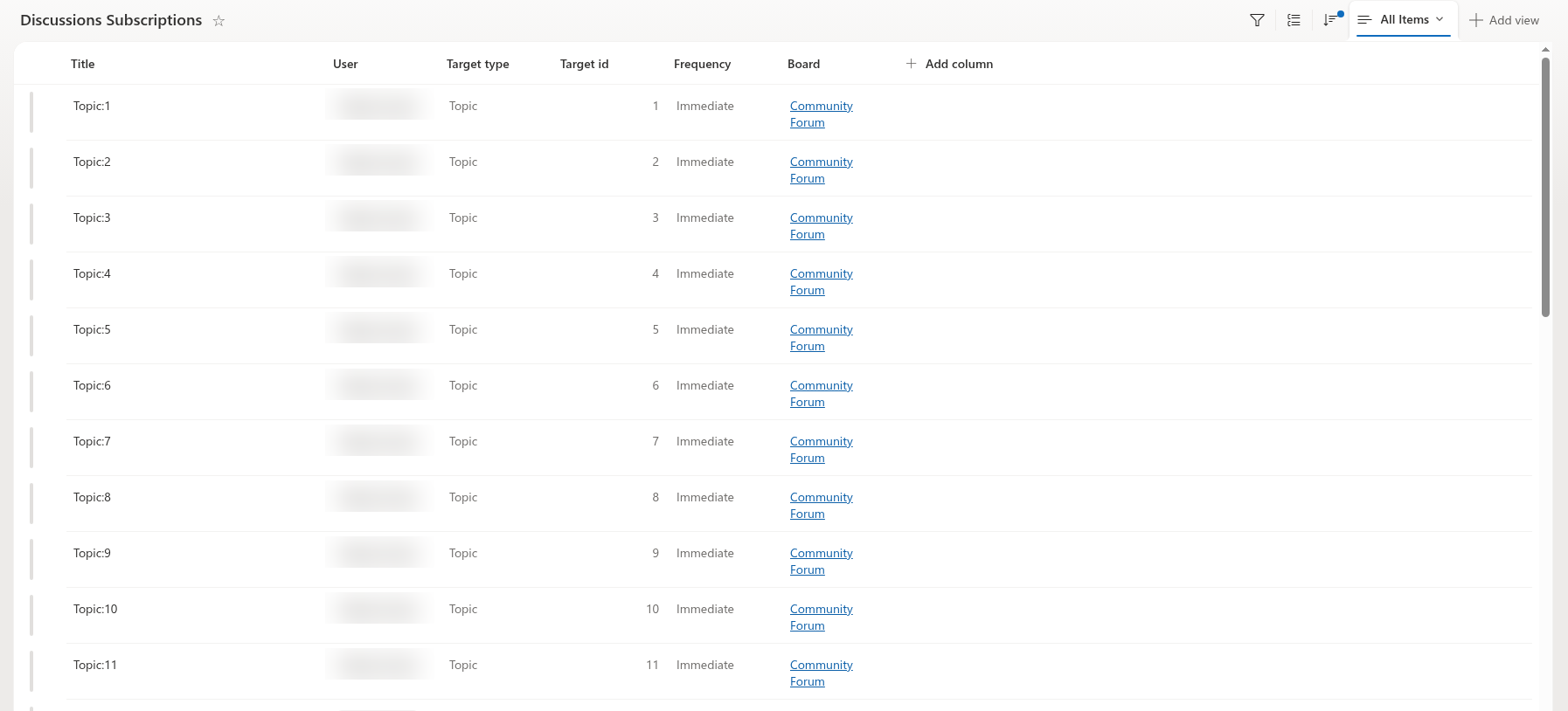
Each follow is one item in the Discussions Subscriptions list, one per user and target: following the same topic again with another frequency updates the item instead of adding a second one, and Unfollow deletes it. Turning notifications off therefore means deleting one's subscriptions; there is no separate "mute" flag. The user guide is in KB10404. Following Boards and Topics: Subscriptions and Digest Frequency.
Mentions
When a user types @ in the editor and picks a person, the web part inserts a link into the body of the post in the form <a href="mailto:…" data-mention-id="{siteUserId}">@Name</a> and, at the same time, adds the person to the Mentions person column of the topic or reply. The column is the signal for a flow: it does not have to parse HTML to find out who was mentioned. Mentions can be edited together with the post; the column is rewritten with every save. See KB10403. Using @Mentions in Discussions.
The Discussions Subscriptions list
| Column | Internal name | Value |
|---|---|---|
| User | VtxUser | The subscriber (person column) |
| Target type | VtxTargetType | Board or Topic |
| Target id | VtxTargetId | The id of the board item in Discussions Boards or of the topic item in Discussions Topics |
| Frequency | VtxFrequency | Immediate, Daily or Weekly |
| Board | VtxBoard | Lookup to the board, also for topic subscriptions, so that all subscriptions of one board can be read with one filter |
| Title | Title | Board:{id} or Topic:{id}, for readability in list views |
The values of the choice columns are stored in English regardless of the interface language; the display names of the columns follow the language of the person who created the lists. The list lives on the same site as the board and inherits the site permissions, which is why posting rights are required to follow.
Events a flow reacts to
All events are ordinary item events of the two content lists; a flow uses the standard SharePoint triggers When an item is created and When an item is created or modified.
| Event | List | Condition |
|---|---|---|
| New topic | Discussions Topics | Item created with Approval status = Approved |
| Topic approved by a moderator | Discussions Topics | Item modified and Approval status changed to Approved |
| New reply | Discussions Posts | Item created with Approval status = Approved |
| Reply approved | Discussions Posts | Item modified and Approval status changed to Approved |
| Best answer accepted | Discussions Topics | Accepted post changed from 0 to the id of a reply |
| Mention | Both lists | Mentions contains users |
| Item waiting for moderation | Both lists | Item created with Approval status = Pending |
On a board without approval every new item is created as Approved; on a board with Require approval of new posts, items from members are created as Pending and become Approved when a moderator approves them, which is the moment the subscribers should be told. Rejected items never produce a notification.
📝 Note
The lists can be renamed by the site owner, because the web part recognises them by column ids. A flow should therefore reference the lists by their id (GUID), not by title, and should read the column values by internal name (VtxApprovalStatus, VtxMentions, …).
Who receives what
The recipient rules of the contract:
- New topic — the subscribers of the board: items with Target type =
Boardand Target id = the Board of the topic. - New reply — the subscribers of the topic (Target type =
Topic, Target id = the Topic of the reply) plus the subscribers of the board of that topic. The author of the reply is excluded. - Best answer — the author of the accepted reply and the subscribers of the topic.
- Mention — the users in the Mentions column of the item. They are notified regardless of any subscription and its frequency; a mention cannot be switched off by the mentioned person.
- Waiting for moderation — the members of the site owners group, who are the moderators of the board.
Frequencies
- Immediate — a flow with the trigger When an item is created or modified sends one e-mail per event to the subscribers with this frequency.
- Daily and Weekly — a scheduled flow collects the topics whose Last activity falls into the period and sends one summary per subscriber. A reply updates the Last activity of its topic, so a digest built on topics covers new replies as well.
Links in the e-mail
A topic opens through the page that hosts the Discussions web part with the query parameter ?topic={Id}, where {Id} is the id of the item in Discussions Topics. The web part does not store the address of its page anywhere in the lists, so the page address is a parameter of the flow. The same deep link is used by the Discussions Activity web part and is described in KB10407. Sharing a Link to a Topic in Discussions (Deep Links).
What a flow has to do
Summarised, a delivery flow built on this contract:
- runs in the context of a site owner or a shared mailbox of your tenant — the sending identity is yours, not Vitextra's;
- triggers on the item events of Discussions Topics and Discussions Posts listed above, by list id;
- reads Discussions Subscriptions filtered by Board (and Target type / Target id) to resolve the recipients, and the Mentions column of the item for mentioned users;
- excludes the author of the item and de-duplicates a person who is both subscribed and mentioned;
- builds the link from its own page-address parameter and the topic id;
- for digests, runs on a schedule and groups the topics by subscriber.
💡 Tip
Because the subscriptions and mentions are plain list data, the same contract works for channels other than e-mail — a Teams chat message or an Adaptive Card sent by the flow uses the same recipients and the same link. Only the final action of the flow changes.