Discussions
Overview
Most problems with Discussions come down to one of three things: the web part is not bound to a board, the lists behind the board are missing or inaccessible, or the user lacks a permission on the site. This article goes through the messages and symptoms in the order in which they are usually met, from the first setup to daily use, with a check and a fix for each. It is written for the page editor and the site owner. Problems with posts that readers cannot see, with uploads and with counters have their own articles, linked at the end.
Start here: what do you see?
| What you see | Go to |
|---|---|
| Not Configured and The web part still needs to be configured... on a published page | Not Configured |
| You do not have permission to create lists on this site. Ask the site owner to set up the board. | No permission to create lists |
| Existing board is greyed out, only New board is offered | No existing board offered |
| The selected board was not found. Open the page in edit mode and pick another one. | Board not found |
| Access denied. or another technical message in a red bar | Access denied and other errors |
| No New topic button; Like and Reply are disabled | Missing buttons |
| No Moderation or Import classic board button | Missing buttons |
| The Discussions Activity web part is not on the published page | Activity web part disappears |
| We hope you enjoyed your free trial. Buy it now to keep it working. | The license message |
Not Configured
Symptom. Readers see the heading Not Configured and the text The web part still needs to be configured. Please open the page in edit mode and provide the necessary information.
Cause. The web part is not bound to a board. It remembers the board and the ids of the Discussions Boards, Discussions Topics and Discussions Posts lists in its properties; if any of them is empty, the setup screen is shown instead of the board. This happens when the page was published before Create board or Use board was clicked, when the page was created from a template or copied, or when the web part was added to a page of another site: list ids belong to the site where the board was created.
Fix. Edit the page and select the web part. The setup screen offers New board (create a board; the lists are created on the site if they do not exist yet) and Existing board (pick one of the boards of this site). Click Create board or Use board, then republish the page. The steps are in KB10391. How to Add and Configure the Discussions Web Part.
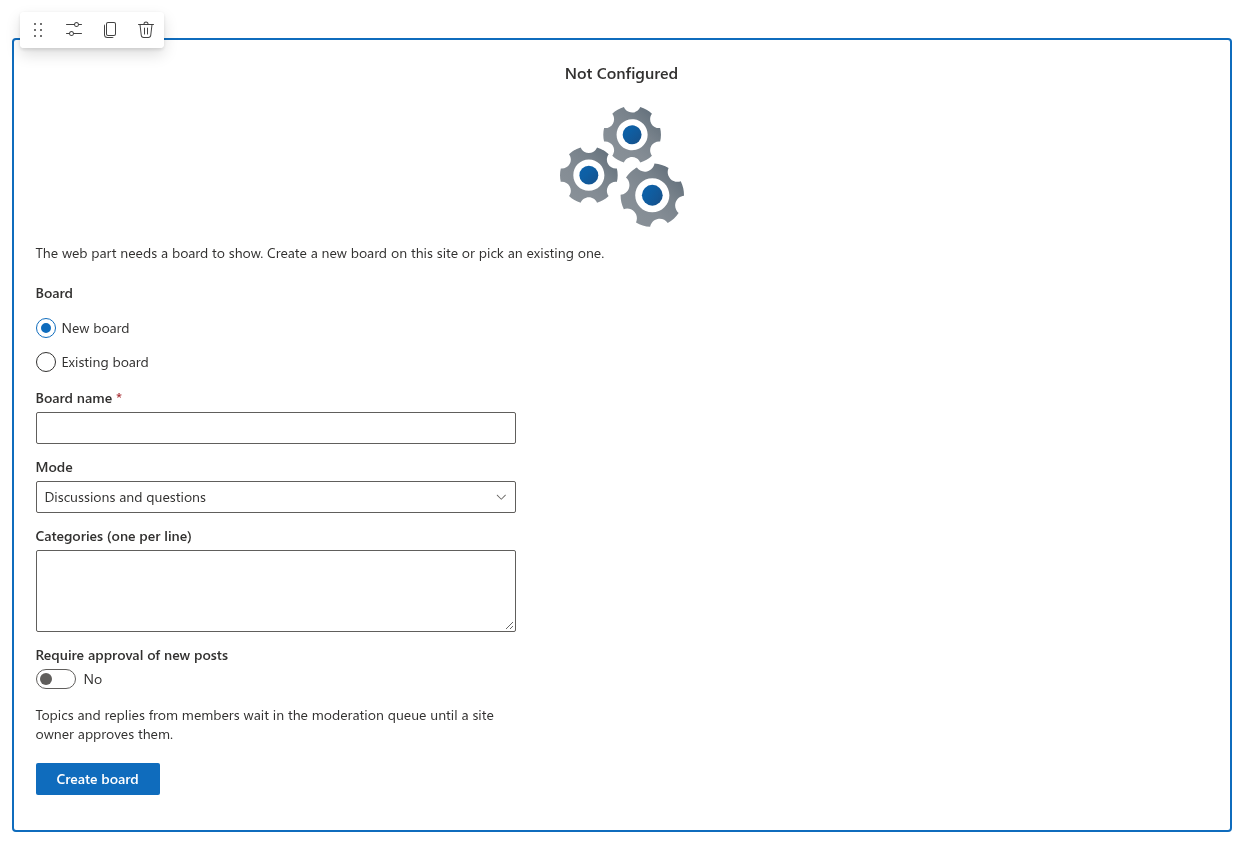
In Microsoft Teams the same screen appears when a tab is added: the tab configuration opens the property pane of the web part on the team's SharePoint site, and the board must be created or chosen there. See KB10393. How to Add Discussions to Microsoft Teams.
No permission to create lists
Symptom. Clicking Create board shows You do not have permission to create lists on this site. Ask the site owner to set up the board.
Cause. The first board of a site needs the five lists to be created, and that requires the Manage Lists permission on the site (members of the site Owners group, or the Edit and Full Control levels). The page editor has only Contribute or a custom level without Manage Lists. The same message appears when the site has the three main lists from an earlier version but still lacks Discussions Subscriptions or Discussions Assets, because they are created at the same step.
Fix. Ask a site owner to open the page in edit mode and click Create board once. After the lists exist, any page editor can add further web parts and pick a board with Use board without Manage Lists. Permissions are explained in KB10408. Permissions in Discussions: Who Can Read, Post and Moderate.
📝 Note
Manage Lists is checked on the site, not on a list. A user who was given Full Control on the Discussions Boards list only, without the site-level permission, still sees this message.
No existing board offered
Symptom. On the setup screen the Existing board option is disabled and only New board can be chosen.
Cause. The site has no boards yet, or the web part could not find the Discussions lists on this site. Lists are recognized by their hidden marker columns rather than by their titles, so a renamed list is still found; a list restored from another site, or a list deleted and recreated by hand with the same name, is not.
Fix. If this is a new site, simply create the first board. If boards exist on the site, check that the Discussions Boards list is still present (Site contents) and that the current user can read it. If a list has been deleted, restore it from the site recycle bin, as explained in KB10411. Where Discussions Stores Your Data: Lists, Columns and Privacy.
Board not found
Symptom. The web part shows the red bar The selected board was not found. Open the page in edit mode and pick another one. and no topics.
Cause. The web part could not read the board item it is bound to. Typical reasons:
- The board was deleted from the
Discussions Boardslist, or the list itself was deleted. - The user has no access to the
Discussions Boardslist: the list stopped inheriting permissions from the site, or the page is shared more widely than the site. - The page, or a page template that contains the web part, was copied to another site; the stored list ids point to lists that do not exist there.
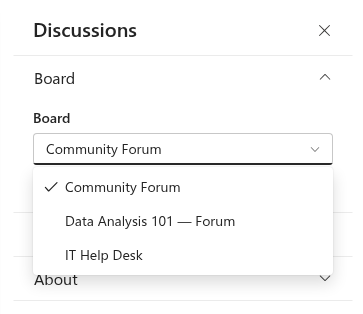
Fix. Restore the deleted board or list from the site recycle bin, or restore the inherited permissions on the list. If the board is really gone, edit the page, open the property pane and choose another board in the Board drop-down of the Board group; if the drop-down is empty, remove the web part from the page, add it again and go through the setup screen. On a page copied to another site, always remove and re-add the web part.
Access denied and other errors
Symptom. A red message bar with Access denied., Sorry, something went wrong. Please refresh the page and try again. or a technical text from SharePoint.
Causes and fixes.
- The user has no access to a list. The web part shows the message that SharePoint returns. The five lists inherit the site's permissions unless someone broke the inheritance; open Site contents, each list's Settings → Permissions for this list, and restore inheritance or grant the audience at least Read.
- Temporary problem. Sorry, something went wrong... is the generic text shown when a request fails without a detailed message, for example during a network interruption. Reload the page; if it persists, note the exact time and contact support.
- The list view threshold. The message The attempted operation is prohibited because it exceeds the list view threshold appears when a query cannot use an index, typically a search on a board with many thousands of topics. See KB10427. Limits and Performance: Large Boards, Long Threads and the List View Threshold.
- A column was deleted. If a site owner removed one of the
Vtxcolumns from a list, requests fail with a message naming the column. Adding a column with the same name by hand does not help, because the web part identifies its columns by fixed ids. Contact Vitextra support for the column definition with the original id, which an administrator can add back with PnP PowerShell; if the list itself was deleted, restore it from the recycle bin instead.
Missing buttons
Symptom. Some users do not see the New topic button, cannot Like or Reply, or do not see Moderation and Import classic board.
Cause. The buttons depend on the user's permissions on the site, not on a setting:
| Button or action | Required permission |
|---|---|
| Read topics and replies | Read |
| New topic, Reply, Like, Follow, Report, Attach file, inline images | Add Items (Contribute, Edit, Full Control) |
| Moderation, Pinned, Featured, Locked, Approve, Edit and Delete of other people's posts | Manage Lists (Edit, Full Control) |
| Import classic board | Manage Lists and the page in edit mode |
Fix. Add the user to the site Members group for posting, or to Owners for moderating. Visitors with Read never see the posting buttons, by design. If the Import classic board button is missing for an owner, edit the page first; the importer is deliberately available only in edit mode.
The Discussions Activity web part disappears
Symptom. The Discussions Activity web part is visible in edit mode but not on the published page, or shows The web part needs a board to show... in edit mode.
Cause. On a published page the Activity web part hides itself completely when it has nothing to show: the site has no Discussions lists, the chosen board has no approved topics yet, or the user cannot read the Discussions Topics list. In edit mode it stays visible so that it can be configured.
Fix. Create a board on the same site (the Activity web part lists boards of its own site only) and post the first topic; check the Board drop-down of the web part and the Board page URL so that links open the board. See KB10415. Showing Recent Discussions on Any Page with the Discussions Activity Web Part.
The license message
Symptom. The whole web part is replaced by We hope you enjoyed your free trial. Buy it now to keep it working. with a Buy It link.
Cause. The 30-day trial has ended, or no subscription is assigned to this tenant. Nothing in the configuration of the web part or the lists causes this message, and the board's content is untouched.
Fix. See KB10434. Discussions Licensing: Trial, Activation and Plans and the general article KB10365. Why Does a Vitextra Web Part Show "We Hope You Enjoyed Your Free Trial"? License Messages and Fixes.
❗ Important
Removing the solution from the app catalog or from the site does not delete the lists, so a reinstalled web part can be bound to the same boards with Use board. Deleting the lists, on the other hand, deletes every topic and reply; empty the recycle bin only when you are sure. See KB10362. How to Remove a Vitextra Solution from SharePoint Online and Microsoft Teams.
Still not solved
Write to Vitextra support with the exact message, the Version and Tenant values from the About group of the property pane, whether the problem occurs for all users or for some, and, for a Teams tab, whether the board opens on the SharePoint page of the same site. The Open List button above the web part opens the Discussions Topics list; a screenshot of its columns helps when a column is reported missing.
💡 Tip
Before reporting a problem, check that the latest version of the package is deployed in the app catalog; updates are described in KB10050. How to Update a Vitextra SPFx Solution in SharePoint Online.