Discussions
Overview
"I posted, but nobody can see it" is the most common question on a board with moderation, and "the topic is there, but not in my list" the most common one without it. In Discussions a topic or reply can be invisible for exactly four reasons: it is waiting for approval or was rejected, the current view or filter excludes it, it is on a later page, or the user has no permission to read it. This article explains each rule as implemented in version 26.10.3 and shows where to find the missing item.
Start here
| What you see | Go to |
|---|---|
| The author sees the badge Awaiting approval or the message Thank you. Your post will be visible after a moderator approves it. | Pending approval |
| The author sees the badge Rejected on a topic or a reply; colleagues do not see the item | Rejected items |
A link to a topic (?topic=ID) shows This topic is not available. It may be awaiting approval or may have been removed. | The visibility rule |
| The topic exists but is missing from Unanswered, Answered or Featured | Views and filters |
| Search finds nothing although the words are in the reply | Views and filters |
| The topic is "gone" after a day or two | Paging and sort order |
| The Discussions Activity web part does not show a new topic | The Activity web part |
| Some users see the board, others get an error | Permissions |
The visibility rule
Every topic and reply carries an Approval status column with one of three values: Approved, Pending or Rejected. The web part applies one rule everywhere, in the topic list, in the thread and in the moderation queue:
| Who | Sees |
|---|---|
| Moderators (users with Manage Lists on the site) | Everything: approved, pending and rejected items |
| Everyone else | Approved items plus their own items, whatever their status |
Whether a new post starts as Approved or Pending depends on the board: when Require approval of new posts is on, topics and replies written by non-moderators start as Pending; posts by moderators are always approved immediately. On a board without the setting, everything is approved on creation and the rule simply has nothing to hide.
The rule also applies to direct links. When someone who is neither the author nor a moderator opens ?topic=ID of a pending or rejected topic, the web part shows This topic is not available. It may be awaiting approval or may have been removed. with the Back to topics button instead of the topic; see KB10407. Sharing a Link to a Topic in Discussions (Deep Links).
Pending approval
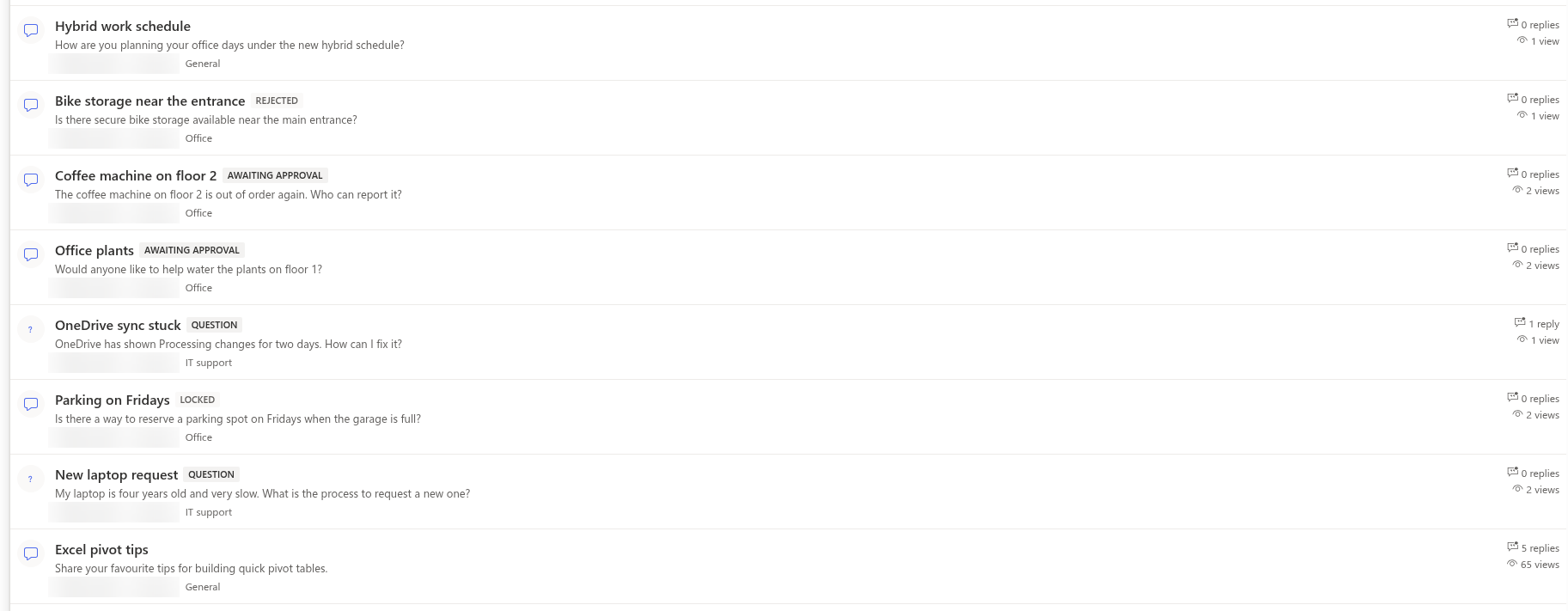
Symptom. The author sees the topic in the list with the badge Awaiting approval, or the blue message Thank you. Your post will be visible after a moderator approves it. after posting a reply. Colleagues do not see the item at all.
Cause. The board requires approval and the author is not a moderator. Until a moderator acts, the item is visible to its author and to moderators only. A pending topic cannot be replied to by its author or other members (the reply box is hidden); moderators can reply to it. A pending reply cannot be replied to or marked as the best answer, and pending replies are not counted in the Replies counter of the topic.
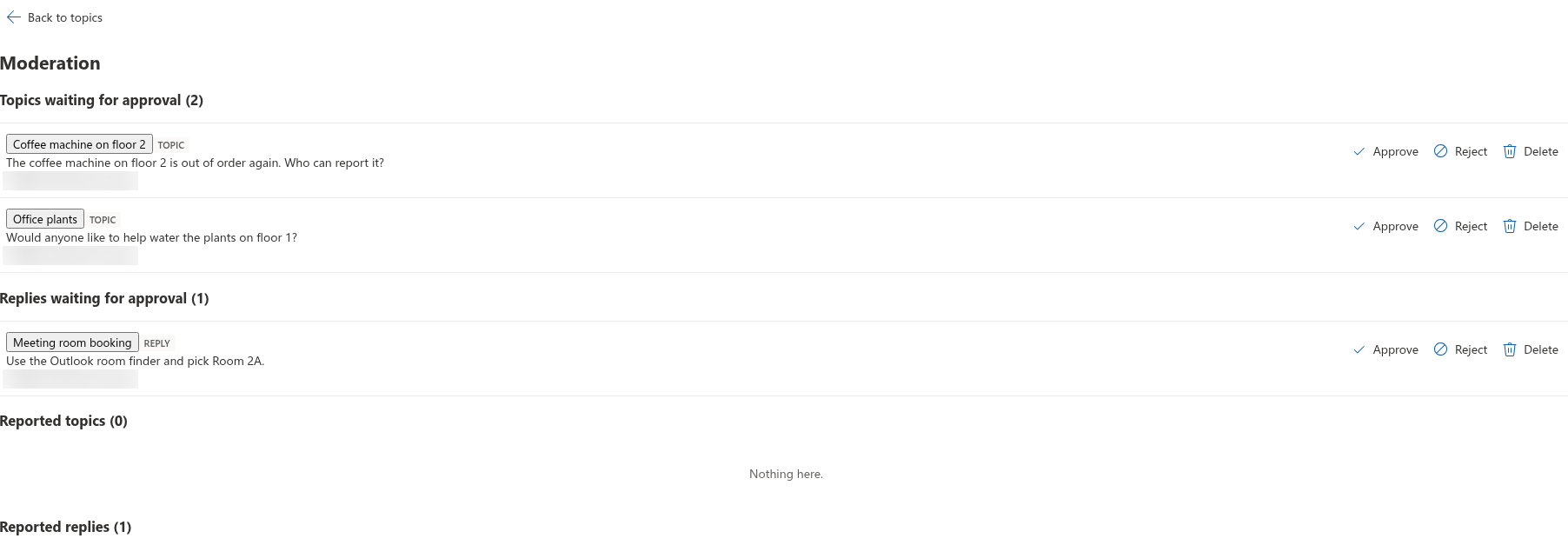
Fix. A moderator opens the board and clicks Moderation on the command bar. The queue has six sections: Topics waiting for approval, Replies waiting for approval, Reported topics, Reported replies, Rejected topics and Rejected replies. For each pending item there are Approve, Reject and Delete; Delete asks for confirmation and, for a topic, removes its replies as well. A moderator who opens the pending topic or reply itself also sees an Approve button under it. The full moderation workflow is described in KB10409. Moderating a Board: Approval Queue, Rejecting and Dismissing Reports.
📝 Note
Approve from the web part rather than by editing the Approval status column in the list. The web part also updates the topic's Replies counter, Last activity and Last reply by (the author of the reply) when it approves a reply; a value changed directly in the list leaves the counters as they were.
Rejected items
Symptom. The author sees the badge Rejected on a topic in the list or on a reply in the thread; colleagues do not see the item.
Cause. A moderator clicked Reject — in the moderation queue for a pending item, or in the Reported topics / Reported replies sections for a reported item that had been approved. A rejected item is not deleted: it stays in the list with the status Rejected. The rule shows people their own items, so the author still sees a rejected topic in the topic list and a rejected reply in the thread, both with the Rejected badge; moderators see them too; other members do not. When an approved reply is rejected, the Replies counter of the topic is decremented.
Fix. Rejection is reversible. The moderation queue lists rejected items in its Rejected topics and Rejected replies sections, each with Approve and Delete. Approve restores the item; for a reply, the Replies counter, Last activity and Last reply by of the topic are updated as for a newly approved reply. Delete removes the item for good after a confirmation. Changing the Approval status column in the Discussions Topics or Discussions Posts list still works, but leaves the counters as they were; see KB10432. Counters, Last Activity or Best Answer Look Wrong.
Views and filters
A topic that exists and is approved can still be absent from what a user is looking at:
- Unanswered shows only topics of type Question without an accepted answer. A Discussion topic never appears here. Locking a question does not move it: a locked question without an accepted answer stays in this view.
- Answered shows topics with an accepted answer (the Accepted post column), whatever their status; a locked question keeps its place here. A question with many replies but no accepted answer is not "answered", and a question whose accepted reply was deleted returns to Unanswered.
- Featured shows only topics a moderator marked with Featured.
- My topics shows topics created by the current user; replies written by the user in other people's topics do not make those topics "mine".
- On a board in Discussions only mode the Unanswered and Answered tabs are not shown at all.
- The category drop-down and the search box stay active when switching views. A topic without a category is hidden while a category is selected; choose All categories. The search looks at topic titles only: a word that occurs in the body or in a reply is not found, and the result is Nothing found.
Fix. Switch to Recent, clear the category and the search box. If the board should open on a different view by default, the page editor can set Default view in the property pane; Unanswered and Answered are offered there only when the board's mode is not Discussions only, and a saved default view that the board no longer offers falls back to Recent. See KB10422. Views, Paging, Search and Counters: Display Settings of the Discussions Web Part.
Paging and sort order
Symptom. A topic that was on the first page yesterday cannot be found today.
Cause. The list is sorted by Pinned first and then by Last activity, newest first, and shows one page of Topics per page rows (20 by default). A topic without new replies moves down as other topics receive replies and eventually leaves the first page. Editing a topic or liking it does not change its last activity.
Fix. Click Load more at the bottom of the list, or search for a word from the title. Moderators can Pin a topic that must always stay on top. Everyone can share a direct link to a topic (?topic=ID), which opens it regardless of the page it is on; see KB10407. Sharing a Link to a Topic in Discussions (Deep Links).
The Activity web part
Symptom. A new topic is on the board but the Discussions Activity web part on the home page does not show it.
Cause. The Activity web part lists approved topics only, for everybody including moderators and the author; a pending topic appears there after approval. It also shows a fixed number of topics (Maximum items, 5 by default) sorted by last activity, and it can be limited to one board in its property pane. On a published page the web part hides itself completely when it has no topics to show. When the license of the solution has expired, it shows the license message instead of the feed, like the Discussions web part; see KB10434. Discussions Licensing: Trial, Activation and Plans.
Fix. Approve the topic; check the Board and Maximum items settings of the Activity web part; see KB10415. Showing Recent Discussions on Any Page with the Discussions Activity Web Part.
Permissions
Symptom. One group of users sees the board and another gets Access denied. or an empty list.
Cause. The lists inherit the site's permissions, so everybody who can read the site can read every board on it. If a site owner broke the inheritance on Discussions Topics or Discussions Posts (for example to make a private board), users outside the list's permissions get an error instead of the topics. A topic deleted from the list is likewise invisible to everyone until it is restored from the recycle bin.
Fix. Restore the inherited permissions on the lists, or grant the audience Read on each of the lists. Note that unique permissions on the lists apply to all boards of the site at once; a single private board among public ones is not possible in this version. See KB10408. Permissions in Discussions: Who Can Read, Post and Moderate.
❗ Important
The moderator role is tied to the Manage Lists permission on the site. Members of the site Owners group are moderators automatically, and so is anyone with the Edit permission level; there is no separate "moderator" setting in the web part. Keep this in mind when deciding who gets Edit rather than Contribute.
💡 Tip
Members can flag content with Report; reported items appear in the Reported topics and Reported replies sections of the moderation queue but remain visible to everyone until a moderator rejects or deletes them. See KB10406. Reporting Inappropriate Posts in Discussions.