Discussions
Overview
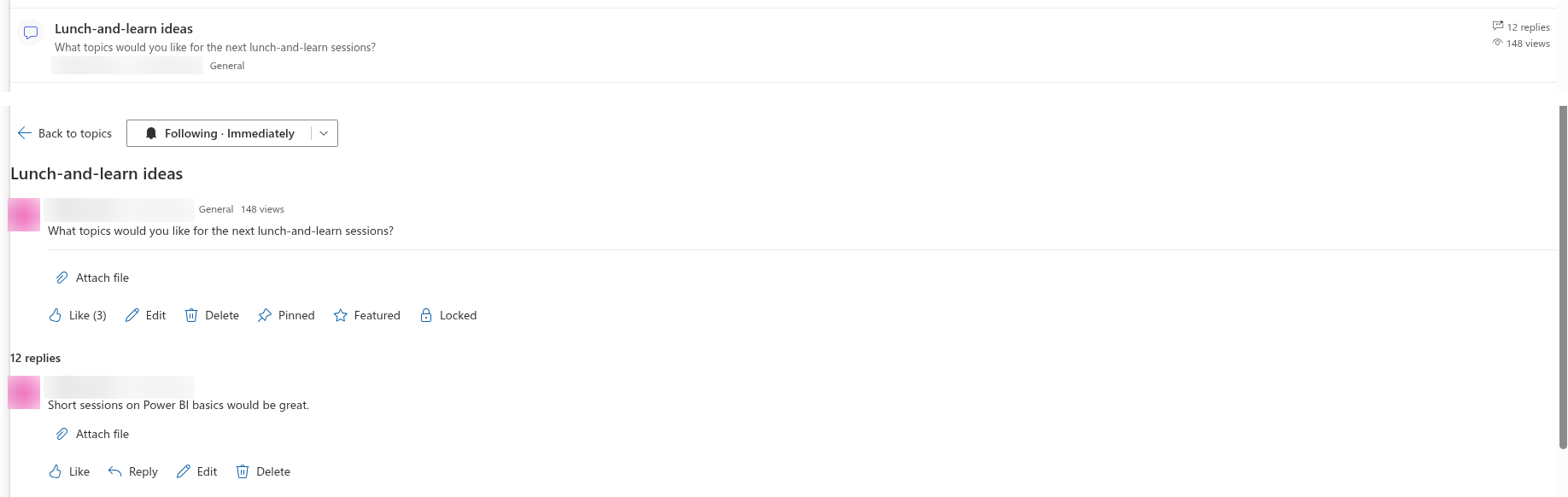
The numbers shown in the topic list of Discussions are not calculated on the fly. Replies, views, likes, last activity, the last person who replied and the accepted answer are stored on the topic item in the Discussions Topics list and updated by the browser of the user who replies, opens or likes. This keeps a board with thousands of topics fast, at the price that a counter can occasionally lag behind reality. This article explains how each value is maintained in version 26.10.3, which situations make it look wrong, and how to correct it. The meaning of the counters for end users is described in KB10405. Likes, Views and Reply Counters in Discussions.
How the values are stored
| Shown as | Column in Discussions Topics | Updated when |
|---|---|---|
| N replies | Replies (VtxReplyCount) | An approved reply is posted (+1), a pending reply is approved in the web part (+1), an approved reply is deleted or rejected in the web part (−1) |
| N views | Views (VtxViewCount) | A user who can write opens the topic (+1), once per topic in a browser session |
| Order in the list, 3 hours ago | Last activity (VtxLastActivity) | The topic is created; an approved reply is posted or approved |
| — | Last reply by (VtxLastReplyBy) | Same as last activity; the value is the author of the reply, also when a moderator approves it |
| Like (N) | Likes (VtxLikeCount) and Liked by (VtxLikedBy) | A user likes or unlikes the topic |
| Answered badge and check mark, Answered view, accepted reply on top | Accepted post (VtxAcceptedPostId) greater than 0 on the topic, Is accepted answer (VtxIsAccepted) on the reply; Status (VtxStatus) is set to Answered together with them, unless the topic is locked | The topic author or a moderator clicks Mark as answer or Unmark answer |
Replies have their own Likes and Liked by columns in Discussions Posts. All these updates are best-effort: if the counter update fails after the reply itself was saved, the reply is kept and the counter is simply not changed. The web part never shows an error for a failed counter update.
📝 Note
The Topics column of the Discussions Boards list (VtxTopicCount) is increased when a topic is created in the web part and decreased when a topic is deleted in the web part, as a best-effort update. It is not shown anywhere in the web part, and topics created by the classic board importer or added and removed directly in the list are not counted, so for an exact figure count the topics of the board in the Discussions Topics list.
Replies counter differs from the thread
Symptom. The list says 5 replies but the thread shows four, or the other way round.
Causes and fixes.
- Pending and rejected replies are not counted. A reply waiting for approval adds to the counter only when it is approved in the web part; a rejected reply is never counted, and when a moderator rejects a reply that was already approved, the counter goes down by one. A moderator sees pending and rejected replies in the thread, so for a moderator the thread can legitimately show more replies than the counter.
- The reply was approved, rejected or deleted directly in the list. Changing Approval status in
Discussions Postsor deleting an item there bypasses the web part, so the counter is not touched. Approve, reject and delete in the web part; if the change was made in the list, correct the counter by hand (see below). - Two people replied at the same moment. Each browser reads the current value, adds one and writes it back; two simultaneous replies can be counted as one. This is rare and self-corrects the next time a value is edited by hand.
- The replier cannot edit the topic item. The counter lives on the topic, which was created by someone else. If a site owner set List settings → Advanced settings → Item-level permissions of
Discussions Topicsto Create items and edit items that were created by the user, nobody but the author and moderators can update the counters of a topic. Keep the default Create and edit all items on the Discussions lists. - Imported topics. The classic board importer sets the counters in its final phase (Updating counters and answers); if the import was interrupted, re-run it. See KB10421. Troubleshooting the Classic Board Import.
Views are not counted, or counted too much
Symptom. A topic read by many people shows a handful of views, or the counter grows when the same person comes back to the topic in a new browser session.
Cause. The web part adds one view when a topic is opened, by writing to the topic item, but only once per topic in a browser session: it stores a flag in the session storage of the browser, so opening the topic again in the same session does not count again. The flag is cleared when the browser tab is closed, so a new session, another browser or another device counts again, and if the browser blocks session storage every opening is counted. Visitors with Read permission cannot write, so their visits are not counted at all; on a board where most people are readers the counter reflects the members only. The visits of the author count like any other. The counter you see when you open a topic is the value before your own visit.
Fix. There is nothing to repair; treat views as an indication of activity among members rather than an audience figure. If the counters are not wanted, hide them with Show reply and view counters in the property pane, see KB10422. Views, Paging, Search and Counters: Display Settings of the Discussions Web Part.
Last activity and last reply by
Symptom. A topic edited today still sits far down the Recent list; a topic whose last reply was deleted keeps its old date; Last reply by names a moderator who never replied.
Cause. Last activity and Last reply by are set when the topic is created and when an approved reply is posted or approved. They are not changed by editing a topic or a reply, by liking, pinning, featuring or locking, by rejecting a reply, or by deleting the last reply, which leaves the previous values in place. When a moderator approves a pending reply, the web part records the author of the reply as Last reply by, not the moderator. Version 26.10.2 recorded the approving moderator, so topics whose replies were approved with that version may still show a moderator.
Fix. The list order is correct for the purpose of showing where conversations happen; if a topic must stay on top, a moderator can Pin it. To correct a value, edit the columns in the list (below).
Best answer and the Answered status
Symptom. A question shows the Answered badge but no reply is marked as the accepted answer; or a locked question still shows the Answered badge; or the accepted answer is not at the top; or Mark as answer is missing.
Causes and fixes.
- The answered state follows the accepted reply, not the status. The Answered badge, the check-mark icon and the Answered view depend on Accepted post being greater than 0; the Unanswered view lists the questions whose Accepted post is 0. Locking an answered question therefore keeps its badge, its icon and its place in the Answered view although Status is Locked, and unlocking the topic sets Status back to Answered (or Open if there is no accepted reply). This is intended.
- The accepted reply was deleted. When the reply is deleted in the web part, the topic clears Accepted post and returns to Open (a locked topic stays Locked), so the question moves back to the Unanswered view. If the reply was deleted directly in the list, or with version 26.10.2, the topic still holds the id of the deleted reply in Accepted post: the badge stays while the thread shows no accepted answer. The author or a moderator marks another reply with Mark as answer (which replaces the stored id), or a moderator sets Accepted post to 0 and Status to Open in the list.
- Only top-level replies can be accepted. Mark as answer is offered on direct replies to the question, not on replies to replies, and only in topics of type Question. A Discussion topic has no best answer and never gets the Answered state.
- Only the author and moderators see the button. Other members do not see Mark as answer at all. A pending reply cannot be accepted until it is approved.
- The topic is locked. Mark as answer and Unmark answer are hidden while the topic is locked. A moderator unlocks the topic first, changes the answer and locks it again.
- Two replies are marked. The web part clears the previous accepted reply when a new one is marked; if the previous one was already deleted at that moment, nothing is left to clear. If a reply still shows Accepted answer wrongly, a moderator opens
Discussions Postsand sets Is accepted answer to No on it. - The status was changed in the list. Setting Status to Answered in the list does not make a topic answered: the badge and the Answered view follow Accepted post. Set Status back to Open unless an answer is marked.
How accepting works for end users is described in KB10400. Marking the Best Answer in Q&A Topics.
Likes
Symptom. Like (3) is shown but only two people are listed in Liked by, or a user cannot remove a like.
Cause. The like count and the list of users are written together from the browser; simultaneous likes from two users can leave the two columns out of step. Whether the Like button is highlighted for a user depends on the Liked by list, the number shown is the Likes counter. Readers with Read permission see the count but cannot like.
Fix. A moderator can align the two columns in the list: set Likes to the number of people in Liked by.
Correcting the values in the list
A moderator can correct any of the stored values directly:
- Click Open List above the web part (or in the Board group of the property pane). The
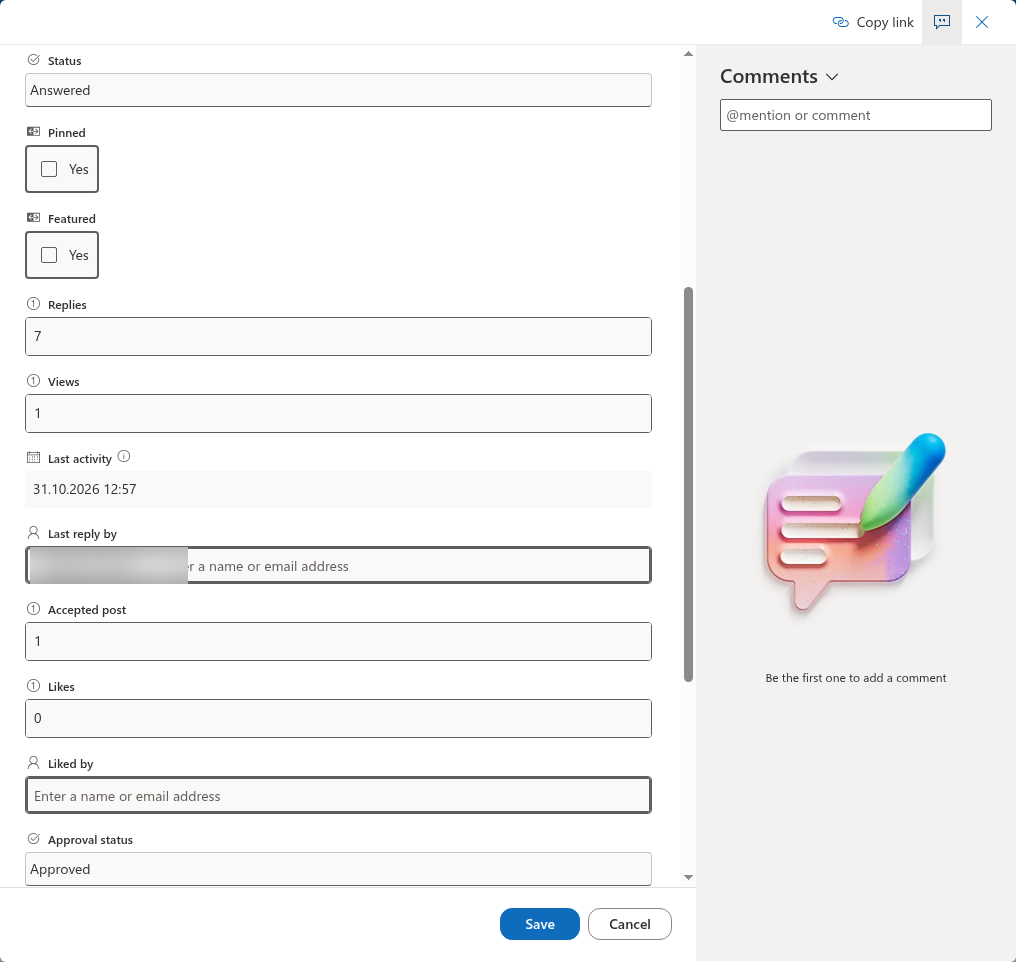
Discussions Topicslist opens. - Find the topic and open its item for editing. The columns Replies, Views, Last activity, Last reply by, Likes, Status and Accepted post can be edited like any list columns. The answered state follows Accepted post: set it to 0 to make a question unanswered again.
- To get the right number of replies, open
Discussions Postsand filter it by the Topic column and Approval status = Approved; the number of items is the value for Replies. - Save and reload the board page.
❗ Important
Edit only the columns named above. Do not change Board, Type, Path, Depth or Parent post, and do not delete or rename the Vtx columns: the web part identifies them by fixed ids and the thread structure depends on them. Every edit of a topic item, including each counted view, creates a version in the list's version history; lower the number of versions kept in Versioning settings if the history grows too fast.