Short URL Online
What is Short URL Online
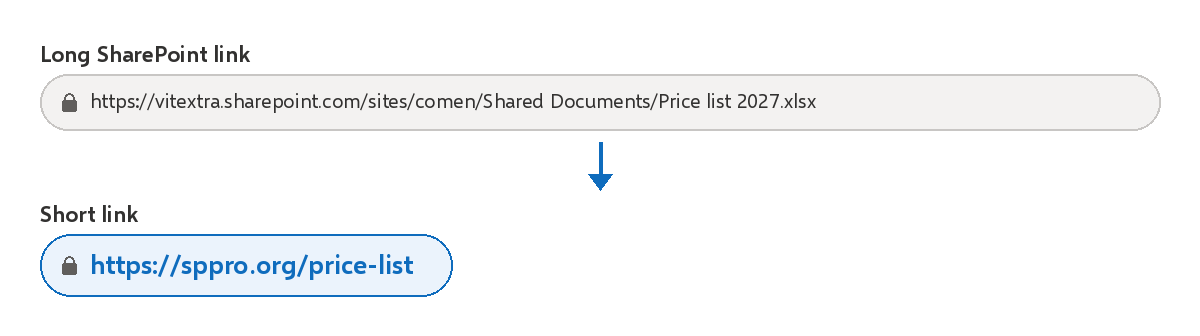
Vitextra Short URL Online lets you create short, memorable links to any content directly from SharePoint in one click. A link to a document that looks like this:
https://contoso.sharepoint.com/sites/Sales/Shared%20Documents/Price%20lists/2026/Price-list-Q4.xlsx
can be shared as:
https://sppro.org/price-list
Short links are easy to read aloud, to print in a brochure or to type on a phone. The target of a short link can be changed at any time without changing the short link itself, so a link that has already been shared keeps working.
What is included
Short URL Online consists of three components. They are delivered in two installation packages, so you can deploy only the part you need.
| Component | Where it appears | What it is for | Package |
|---|---|---|---|
| Short URL command | The command bar of a document library | Create or edit the short link of the selected document or folder | vitextra.short-url-online.sppkg |
| Short URL web part | A SharePoint page | Create a short link to any web address typed into the web part | vitextra.short-url-online.webparts.sppkg |
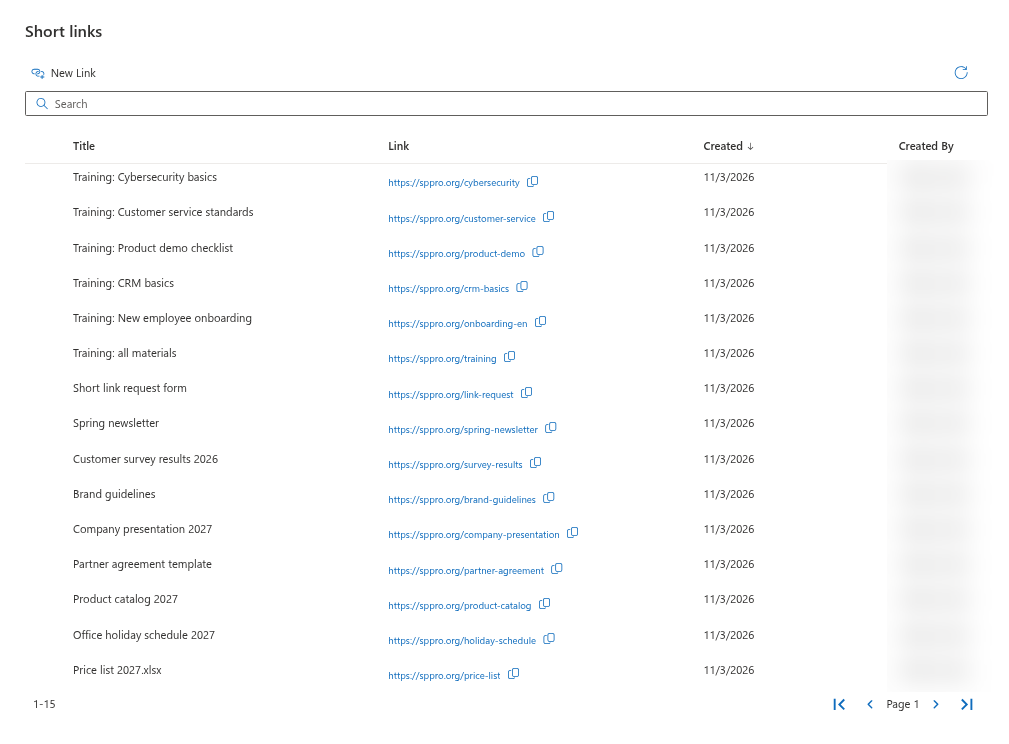
| Short URL Management web part | A SharePoint page or a full-width app page | Find, create, edit and delete all short links of your organization | vitextra.short-url-online.webparts.sppkg |
The Short URL command
The command appears in the command bar of document libraries on every site where the app has been added. It is visible when exactly one item is selected. It opens a dialog with the short link of that document or folder; if the item has no short link yet, one is created automatically. For the procedure, see KB10471. How to Create a Short Link for a Document or Folder in SharePoint Online.
The Short URL web part
The Short URL web part is a small form that you place on a page. Users enter a title, the original web address, a domain and a short name, and get a short link that they can copy. The address can lead anywhere: a SharePoint page, a document, or an external site. For details, see KB10475. How to Add the Short URL Web Part to a Page.
The Short URL Management web part
The Short URL Management web part is the control center for all the short links of your Microsoft 365 tenant. It shows them in a searchable, sortable list and lets you create, edit and delete links. In the edit panel you can also add UTM parameters and set separate target addresses for Windows, Mac OS, iPhone and Android. For details, see KB10474. How to Add and Configure the Short URL Management Web Part.
Domains
Every short link consists of a domain and a short name. You choose a domain when you create a link. The Short URL dialog and web part offer the domains sppro.org and befly.nl; the Short URL Management web part loads the list of domains from the Short URL service. For more information, see KB10473. How to Choose a Domain and Customize the Short Name of a Link in Short URL Online.
📝 Note
Short links are stored in the Vitextra Short URL service, separately for each Microsoft 365 tenant. Your organization sees only its own links in the Short URL Management web part.
Link types for documents
When you shorten a document, you can choose whether the short link opens the item itself or the online editor. For more information, see KB10472. Link to Item vs. Link to Online Editor: Choosing the Target Link Type in Short URL Online.
Installation and licensing
- To deploy the packages and add the app to a site, see KB10057. How to Deploy and Set Up Short URL Online.
- Short URL Online is a licensed product with a free trial period. When the trial or the subscription expires, the web parts show a message asking you to buy the product; see KB10365. Why Does a Vitextra Web Part Show "We Hope You Enjoyed Your Free Trial"? License Messages and Fixes.
💡 Tip
If you only want a quick way to shorten documents, deploy the vitextra.short-url-online.sppkg package and add the app to the sites you need. If you also want a central place to manage links, deploy vitextra.short-url-online.webparts.sppkg as well.