Folder Tree
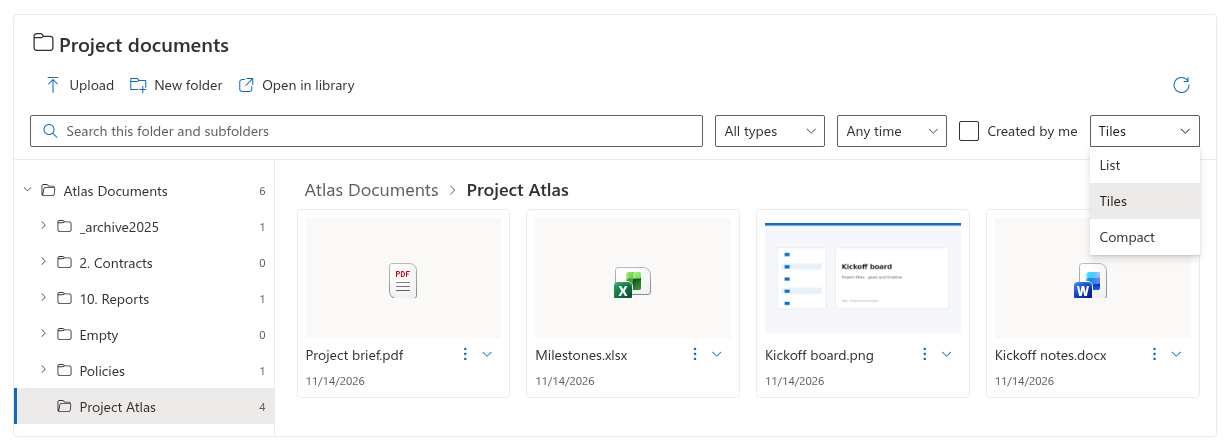
Set the default view
- Edit the page and open Settings → Files.
- In Default view, choose List, Tiles or Compact.
- Enable Allow users to switch views if visitors should be able to choose another view.
- Save or republish the page.
Compare the views
| View | What it displays |
|---|---|
| List | A table with names, the configured metadata columns and item actions. |
| Tiles | Cards with names, modification dates, item actions and previews when available. |
| Compact | The same document table with more compact rows. |
Configured metadata columns apply to the table views. Tiles do not reproduce every selected column. A missing thumbnail does not mean that the document is missing; the file-type icon remains available.
📝 Note
A visitor's view switch changes the current display, not the editor's saved default. The current implementation does not save that personal view choice between sessions.
Check the published result
If view switching is allowed, use the view selector next to the quick filters. Open a folder and check both a table and tiles. If the selector is absent, ask the page editor to review Allow users to switch views. Available file actions are controlled separately.