Folder Tree
Open a document
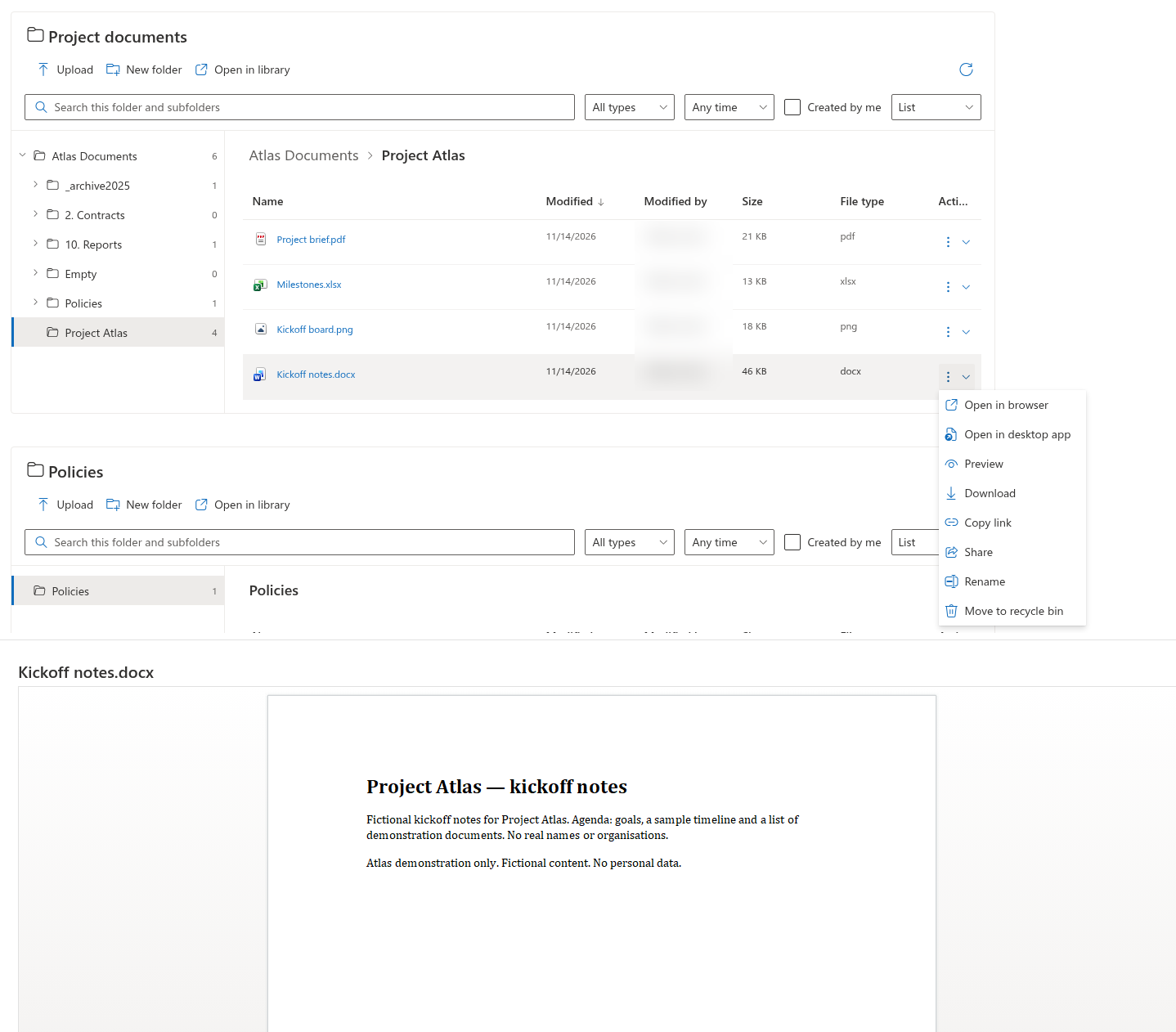
Select a file name in a table, or its preview area in tiles, to open it in the browser when that action is enabled. You can also open the item's three-dot Actions menu and select Open in browser. Selecting a folder navigates into it instead.
Use an Office desktop app
For supported Word, Excel and PowerPoint files, choose Open in desktop app from the item menu. Folder Tree offers this command for doc, docx, docm, xls, xlsx, xlsm, ppt, pptx and pptm. The device must have an application that handles the corresponding Office link. Browser or device prompts are handled outside Folder Tree.
Preview or download
- Open the file's Actions menu.
- Select Preview to display the SharePoint viewer in a side panel, when the command is available.
- Close the panel to return to the folder, or use Open in library if that action is enabled and you need the library interface.
- To save the document locally, select Download from the item menu.
📝 Note
Preview availability depends on the document and SharePoint viewer. The page editor can disable opening, desktop-app opening, preview or download independently. A missing command is not necessarily an access error.
Download scope
Download operates on one file at a time. Folder Tree does not provide a multi-file ZIP download or a folder download in the current version. SharePoint still enforces the user's permissions for each requested document.