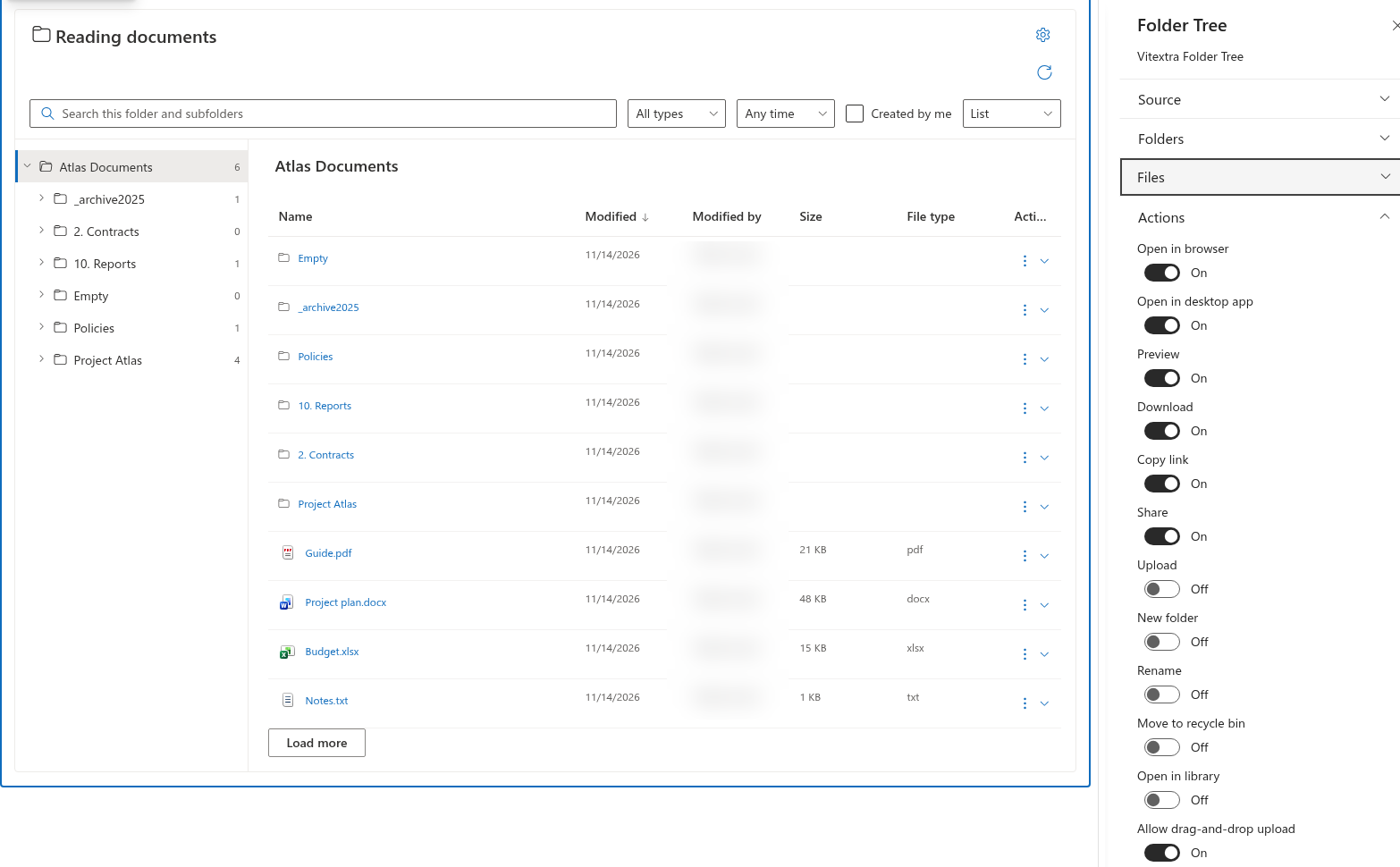
Folder Tree
Configure commands
- Edit the page and open Settings.
- Expand Actions.
- Enable or disable the commands that fit the page's purpose.
- Save or republish the page and test with a representative visitor account.
Opening in the browser, opening in a desktop app, preview, download, copying links, sharing, uploading, creating folders, renaming, recycling items and opening the library each have a separate switch. All are enabled in the initial configuration, but SharePoint permissions still determine whether a user can complete an operation.
Control upload methods
Upload controls file upload availability. Allow drag-and-drop upload additionally controls the drag-and-drop route. Turning off drag and drop does not turn off the upload button. Turning off upload prevents either route, even if drag and drop remains enabled. New folder is configured independently.
❗ Important
Disabling a command removes that route from this web part; it does not revoke SharePoint permissions or block the same operation elsewhere. Use SharePoint permission management when access itself must change.
Review a reading-focused page
For a page intended mainly for reading, consider disabling upload, new-folder creation, rename and recycling while retaining the required opening or preview commands. Review Open in library separately if the page should not offer a direct route to the full library interface. Disabling browser opening does not automatically disable preview, download or desktop-app opening.