Policy Acknowledgement
 is a Vitextra solution for organizing how employees receive company policies and record that they have read them. It connects a policy catalogue, controlled publication, employee assignments and management reporting in SharePoint Online. Employees use dedicated pages to find their work, read a policy, ask questions and submit a confirmation. A personal My Policies app can also provide the entry point in Microsoft Teams.
The product is useful when storing a document in a library is not enough: someone must decide which version applies, who should receive it, when they should respond and how outstanding work will be followed up. For example, an organization can assign a security policy to a pilot department, publish a material revision later and track the resulting update assignments separately from the first release.
What you can organize with the solution
Typical uses include introducing an internal policy to a defined employee group, requesting acknowledgement after a material change, reviewing the policies a team has outstanding, and investigating why an employee cannot confirm a statement. A company can retain a browsable catalogue alongside required personal assignments: being able to read a policy does not necessarily mean that a confirmation has been assigned.
The solution supports audience rules based on groups and employee attributes. This helps policy owners target a business population without maintaining a separate manual spreadsheet for every campaign. Individual inclusions and exclusions support exceptions, while an audience preview provides a checkpoint before assignments are created.
Recurring and always-on campaign options are present, but their names should not be taken as proof that a complete background process is operating. Later audience updates, scheduled reminders and escalations require the separate service component. Same-version assignment deduplication also limits repeat certification in the current implementation.
The objects behind the workflow
| Object | What it represents | Why it matters |
|---|---|---|
| Policy | A card with a title, owner, category, source, dates and reading controls. | Separates policy management from the file or page containing its text. |
| Version | A published release with a number, change description and, where supported, a fingerprint and snapshot. | Identifies the release associated with a campaign and confirmation. |
| Campaign | A policy-version distribution with an audience and due settings. | Defines a particular assignment operation. |
| Assignment | One employee's work item for a policy version and campaign. | Tracks deadline, status and the associated confirmation. |
| Acknowledgement | The recorded confirmation or another evidence event. | Retains the statement, identity, time and related technical evidence. |
| Question | An employee's question or reason for being unable to acknowledge. | Gives the owner a work queue for resolving exceptions. |
Publishing a version and creating assignments are separate actions. A first publication makes a release available; it does not automatically launch a campaign. Similarly, opening content in the library does not automatically create an assignment or record a confirmation.
Who does what
Administrators configure storage, roles and service settings. Compliance managers manage policies and campaigns across the product and decide exemptions. Authors create policies and work with cards they own. Auditors use reporting views. Employees receive assignments, and managers follow their reporting teams.
Role groups are configured centrally in Policy Admin. Policy ownership is a separate field, so changing the owner can change what an author sees. The reporting hierarchy comes from directory relationships; it is not a manually maintained sixth role in the role-assignment list. Product roles do not automatically give someone the ability to edit SharePoint pages or deploy applications.
Follow a policy from draft to confirmation
- Prepare the hub and connect the employee and management pages to it.
- Create a policy card, assign its owner and choose a document, SharePoint page or external URL as the source.
- Set the acknowledgement statement and any reading conditions, then publish the first version.
- Create a campaign, inspect its audience and specify the acknowledgement deadline.
- Ask a pilot employee to open the assignment, read the content and submit the confirmation.
- Verify the employee's receipt and the reporting result before broadening the campaign audience.
For example, a policy owner can first assign a fictional information-security policy to a small group. If an employee cannot confirm the statement, the employee can provide a reason instead. The case goes to review; an authorized user can answer, reopen the assignment or record an exemption with a reason. An exemption is not a confirmation made on the employee's behalf.
Choose the appropriate web parts
| Web part | Main user | What the user can do |
|---|---|---|
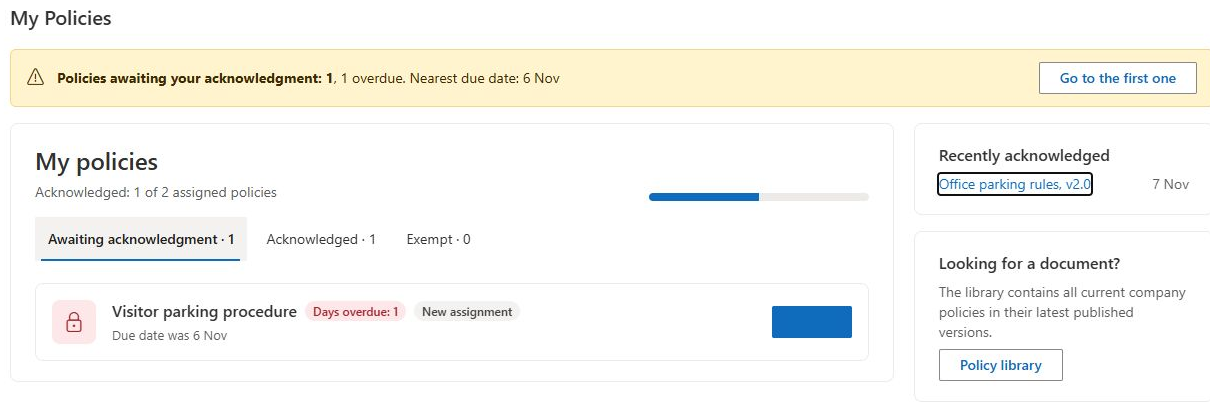
| My Policies | Employee | Find pending work, deadlines, completed confirmations and exemptions. |
| Policy Reader | Employee | Read the source, satisfy configured conditions, confirm the statement, ask a question and view a receipt. |
| Policy Library | Policy reader | Browse published and under-review policies by category and search their metadata. |
| Pending Policies Bar | Intranet visitor | See a compact prompt for assigned and overdue policies and open the relevant page. |
| Policy Manager | Owner or compliance team | Create and publish policies, launch campaigns, review versions and resolve employee questions. |
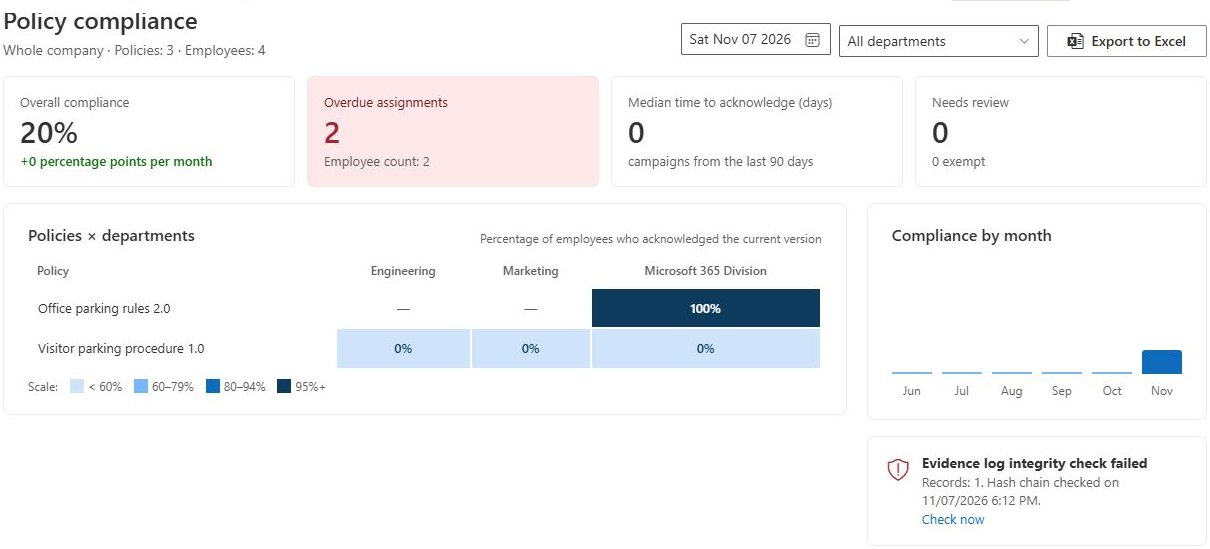
| Compliance Dashboard | Reporting user | Inspect indicators, department comparisons, historical calculations, exports and evidence-integrity results. |
| Team Compliance | Manager | Review employees against policies and send manual reminders for overdue assignments. |
| Policy Admin | Administrator | Complete setup, manage roles, categories, texts, notification settings, storage checks, licensing and the audit log. |
Pages can be arranged around the organization's navigation. The common reader page uses policy and assignment identifiers in its URL; the other web parts link to it. Creating storage does not create all these pages, so page setup and a navigation test are part of deployment.
Content, versions and reading conditions
A document source can be displayed through a browser or Office viewer. SharePoint pages can be rendered inline when their page content can be read. External URLs are opened or embedded according to the destination site's behavior. Selecting a source does not grant access to it, and an external site may prohibit embedding.
For supported same-origin documents, publication stores a snapshot and calculates a SHA-256 fingerprint. Page and external-source version records do not provide equivalent archived-content snapshots. The reader currently displays the configured source rather than automatically switching to the saved snapshot for an older assignment. Use explicit snapshot links when inspecting an archived document version.
Owners can require opening, scrolling, a minimum time and a typed name. These are completion conditions, not proof that someone understood the text. For framed non-page content, the scroll condition can be satisfied by opening and waiting for the required interval. The recorded confirmation is not an electronic signature.
Understand progress and evidence
My Policies gives an employee a personal list. Team Compliance gives a manager a team-oriented matrix. Compliance Dashboard aggregates assignments for the permitted policy scope, with department and date filters. These views answer different questions and can have different denominators or version scopes; their percentages should not be assumed to be interchangeable.
The acknowledgement receipt records the policy, version, confirmation time, statement and hashes where applicable. The audit log records administrative and workflow actions. An Excel compliance export contains assignment rows; it is not a complete export of every evidence field or every historical transition.
Deployment and operating modes
The SPFx solution uses a SharePoint hub site with lists and a version library. Microsoft Graph supplies employee, group and reporting-relationship data and supports manual email reminders. Prepare deployment approval, source-content access, role groups and the page structure before a pilot. Licensing is managed through the existing Vitextra licensing workflow.
Direct mode records ordinary confirmations through the employee's session. Service mode sends them to the separately connected service. Switching the setting does not install that service or automatically reapply SharePoint permissions. Automatic notification settings also do not constitute a running scheduler.
❗ Important
Direct mode grants employees write access to assignments and acknowledgement records. The current role matrix is list-level, and owner or employee filtering in a web part is not record-level isolation. Hash-chain verification can detect inconsistencies but does not make records absolutely immutable. Permission synchronization retains Full Control for its executing account, so the interface's stronger Service-mode protection claim must be checked against effective permissions.
Plan a successful first rollout
Start with the quick-start guide in KB10496. Policy Acknowledgement: Quick Start Guide, then verify requirements in KB10497. Policy Acknowledgement: Requirements and Permissions and access configuration in KB10500. How to Configure Policy Acknowledgement Roles and Permissions. Select a source that the pilot employee can actually open, use a clearly limited audience, and test both a successful confirmation and a question or inability-to-acknowledge case.
Before expanding, verify the reporting result, examine the stored evidence and confirm who can read or change the underlying data. Review KB10509. Policy Acknowledgement Data Storage: Direct and Service Modes for recording modes and protection limits. Treat background-service behavior as a separate deployment check: the web-part project alone does not establish that scheduled operations, service permissions or notification delivery are working in your environment.