Policy Acknowledgement
Prepare deployment permissions, source-content access and product roles before launching a policy campaign. Approval of Microsoft Graph permissions and assignment of product roles are separate tasks.
Deployment and setup access
The solution is an SPFx package for SharePoint Online. Follow KB10035. How to Install a Vitextra Product in SharePoint Online for the package installation procedure. The person completing initial setup must be able to administer the selected storage site and create the required lists. Creating a new site also requires permission to create that site in the tenant.
Before an administrator group is configured, Policy Admin uses a site-owner fallback. Once that group is assigned, group membership determines product administration. Product roles do not automatically grant permission to edit SharePoint pages or deploy tenant applications.
Microsoft Graph permissions
The solution package requests the following Microsoft Graph scopes:
| Scope | Product use |
|---|---|
User.Read.All | Employee profiles and organizational information. |
GroupMember.Read.All | Group membership used by audiences and roles. |
Directory.Read.All | Directory data used by employee and group lookups. |
Mail.Send | Manual reminder email sent through the current user's mailbox. |
Have the tenant administrator approve the package's requests through the organization's SharePoint API access administration process. If employee or group pickers cannot load data, verify those approvals before changing audience rules.
Hub and content permissions
Assign role groups and apply permissions in Policy Admin. All web parts must connect to the same intended hub. Employees also need access to the original policy content: configuring a URL in a policy card does not grant permission to the referenced file, page or external website.
For controlled access, use explicit Entra ID or hub-site SharePoint groups. Do not treat the All licensed users option as a per-user license validation: its current role-resolution logic does not check each user's license.
Check each access layer independently
A working deployment requires several independent forms of access. The person who deploys the package need not be the person who manages policies, and an employee does not need deployment privileges to read an assignment. Separating these responsibilities makes it easier to diagnose a failure without granting broad administrative access as a workaround.
| Access layer | A useful acceptance check | Typical consequence of a failure |
|---|---|---|
| Package and page | The intended user can load the published page and web part. | The application cannot be reached or rendered. |
| Directory | The authorized operator can resolve the intended employees and groups. | Pickers, audience selection or role resolution can fail. |
| Hub data | The account can read the records required by its role. | A page can open but fail while loading policies or assignments. |
| Source content | The employee can open the document or website directly. | A visible policy card can still have unreadable content. |
| Evidence writing | A pilot employee can complete the configured recording path. | Reading succeeds but confirmation fails. |
| Reporting hierarchy | The directory has the expected manager relationships. | A manager's team can be incomplete or different from expectations. |
Perform the checks with representative accounts. An administrator who is also a site owner may succeed through elevated SharePoint access even when a normal employee would fail. Likewise, a policy owner who belongs to several role groups is not a reliable stand-in for a restricted author account.
Prepare a deployment handover
Record the chosen hub URL, employee entry page, reader page, role groups and source locations. Identify who can maintain each of them. A policy owner should know whom to contact when a source file is moved; a support administrator should be able to distinguish a page-navigation problem from a service-write problem without reconstructing the deployment from scratch.
Check the representative employee's directory identity and manager before launching the pilot. Campaigns store employee and manager information on assignments. Later directory changes do not mean that every old assignment field has been rewritten. A reorganization is therefore a reason to verify team reporting, not just to check that the employee can sign in.
For manual email reminders, test the operator who will actually send them. The application uses that person's mailbox, whereas automatic notifications depend on the separate service configuration. Approving a mail-related API request does not by itself verify a mailbox, a particular recipient's delivery or the background service.
Keep the results of these checks alongside the deployment details. When a failure is reported, include the affected account, hub and page, operation and error time. This is more actionable than a general statement that “permissions were approved,” because each layer can succeed or fail independently.
Service and recording mode
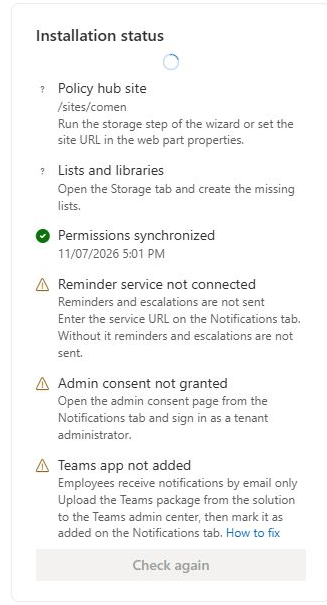
Service mode needs a reachable service URL and successful administrator-consent verification. The service consent is separate from the SPFx package's Graph permission approval. Automatic reminders, escalations and ongoing audience processing require the separate service component; entering settings alone does not run those jobs.
❗ Important
Direct mode grants employees contribution rights on the assignment and acknowledgement lists. Review KB10500. How to Configure Policy Acknowledgement Roles and Permissions and KB10509. Policy Acknowledgement Data Storage: Direct and Service Modes before using production employee data. Web-part filters and audience targeting are not substitutes for data permissions.