Policy Acknowledgement
 stores its working data on a SharePoint policy hub. The recording mode determines how normal employee acknowledgements are written. It does not move the solution's data to a different storage site.
What the hub stores
| List or library | Purpose |
|---|---|
Policies | Policy cards, current version and reading controls. |
PolicyVersions | Version metadata and document snapshots where supported. |
PolicyCategories | Categories and their confirmation texts. |
PolicyCampaigns | Audience definitions, deadlines and reminder settings. |
PolicyAssignments | Employee assignments and their current status. |
PolicyAcknowledgements | Confirmation and other evidence events with chained hashes. |
PolicyQuestions | Employee questions, reasons and responses. |
PolicyNotificationLog | Notification-log storage. |
PolicyAuditLog | Administrative and workflow events. |
PolicySettings | Product settings. |
PolicyRoleAssignments | Role-to-group mappings. |
Source documents remain at their configured URLs. Publishing a same-origin document can save a snapshot in PolicyVersions; external sources do not receive such a snapshot or a content hash.
Compare recording modes
| Aspect | Direct | Service |
|---|---|---|
| Normal acknowledgement write | The web part writes to SharePoint using the employee's session. | The web part sends the acknowledgement to the connected service. |
| Employee permissions in the role matrix | Contribution on assignments and acknowledgements. | Read access on those two lists. |
| Separate service required for this write | No. | Yes, with a working endpoint and consent. |
| Automated reminders and audience updates | Not supplied by Direct mode. | Depend on the connected service's implementation and operation. |
Direct mode is the default setting. Selecting Service does not install the service or verify all its operational behavior.
Configure and verify a mode change
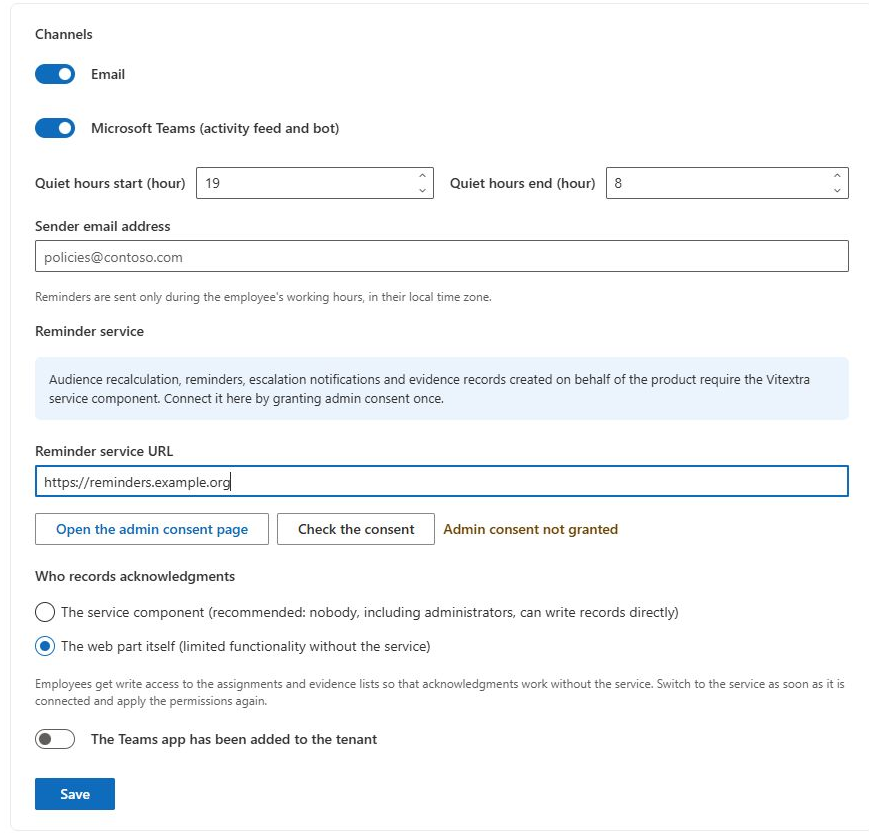
- Open Notifications in Policy Admin.
- For Service mode, enter Reminder service URL, open administrator consent and run Check the consent.
- Choose the required option under Who records acknowledgments and save.
- Open Roles and select Save and apply permissions.
- Inspect effective SharePoint permissions and test a confirmation using a separate employee account.
Saving a mode setting does not reapply permissions automatically. The reader blocks normal submission when Service mode lacks a URL or confirmed consent; a later service outage is reported as a submission error.
Follow the record through the application
The card, assignment and acknowledgement are different records. The card describes the current policy; the assignment identifies a person's work for a version and campaign; the acknowledgement records an evidence event. A receipt displays selected evidence fields. These records usually agree after a successful submission, but they should not be treated as one atomic object.
In the direct path, the application reads the preceding hash, appends the acknowledgement and updates the assignment. In the service path, it sends the payload to the configured endpoint and retrieves the resulting record. A later read or update can fail even if an earlier write succeeded. This is why investigation should compare the assignment reference and evidence record before asking an employee to retry.
Changing recording mode changes the path for ordinary acknowledgements, not the location of all policy data or every administrative operation. It also does not rewrite earlier events into a new evidence model. Keep the original records and inspect how the deployment's effective permissions and service behavior support the intended protection requirements.
Separate the checks needed for a mode change
| Check | What to verify |
|---|---|
| Configuration | The saved mode, endpoint and consent status match the intended setup. |
| Permissions | The product matrix was reapplied and actual list rights were inspected. |
| Employee confirmation | A representative employee can submit and obtain the correct receipt. |
| Assignment reconciliation | The matching assignment has the expected status and evidence reference. |
| Exception workflow | An authorized operator can resolve a test case, including the separate exemption path where used. |
| Background work | The service owner can demonstrate the required scheduled jobs and delivery behavior. |
Perform these checks with accounts that represent the production roles. Testing only as the synchronizing administrator can conceal the additional Full Control grant that account retains. Likewise, a successful consent response does not establish that all server-side writing, scheduling and delivery operations are healthy.
Interpret integrity as one part of protection
A hash chain links records so that a changed record or certain missing records can produce a mismatch. It does not supply an independent trusted inventory of everything that should exist. Removing the end of a chain or replacing an entire chain can require other controls or retained evidence to detect. The green indicator therefore means that the loaded chain passed the implemented consistency checks.
Use the integrity result together with permissions, source/version evidence and operational records. A matching record hash does not prove that the reader displayed an archived file, that every required employee event exists or that the employee understood the text. If you find an inconsistency, preserve identifiers and original data before making corrective changes; see KB10533. How to Check the Integrity of the Acknowledgement Log and KB10538. Troubleshooting Failed Acknowledgements and Missing Notifications.
Understand the evidence boundary
An evidence event includes identity, policy and version information, a timestamp, confirmation text, reading-control data and hashes. The application checks a chain of record hashes to detect inconsistencies. This is not an absolute immutability guarantee.
❗ Important
The interface describes Service mode as preventing direct writes even by administrators, but the current permission-sync code retains Full Control for the account performing synchronization. Elevated or existing grants also require inspection. Direct mode grants employees contribution rights, and the matrix does not isolate records per employee. Do not claim that all evidence is technically immutable or that web-part filtering provides record-level security.
Exemption events currently use a direct SharePoint write even in Service mode. That path can fail for a compliance manager with only the documented matrix permissions. See KB10507. How to Handle Policy Questions and Exempt Employees. The separate service implementation is not part of the web-part project, so its application permissions, background processing and protection controls must be verified in the actual deployment.