Policy Acknowledgement
Archive a policy when it should no longer appear in the normal published catalogue. This changes the policy card's lifecycle state. It is not a data-deletion, retention, assignment-revocation or permission-removal operation. Decide what should happen to existing work before changing the status.
Review the impact first
Open the card as an administrator, compliance manager or owner with management access. Check its current version, active campaigns, outstanding assignments and relevant receipts. If you are replacing it with another policy, record which card and version will be used for the replacement campaign.
Do not assume that archiving will hide the source document. The source remains at its configured URL with its own permissions. Existing evidence and version files also remain in their storage locations.
Archive the policy
- In Policy Manager, select the intended policy and verify its title and current version.
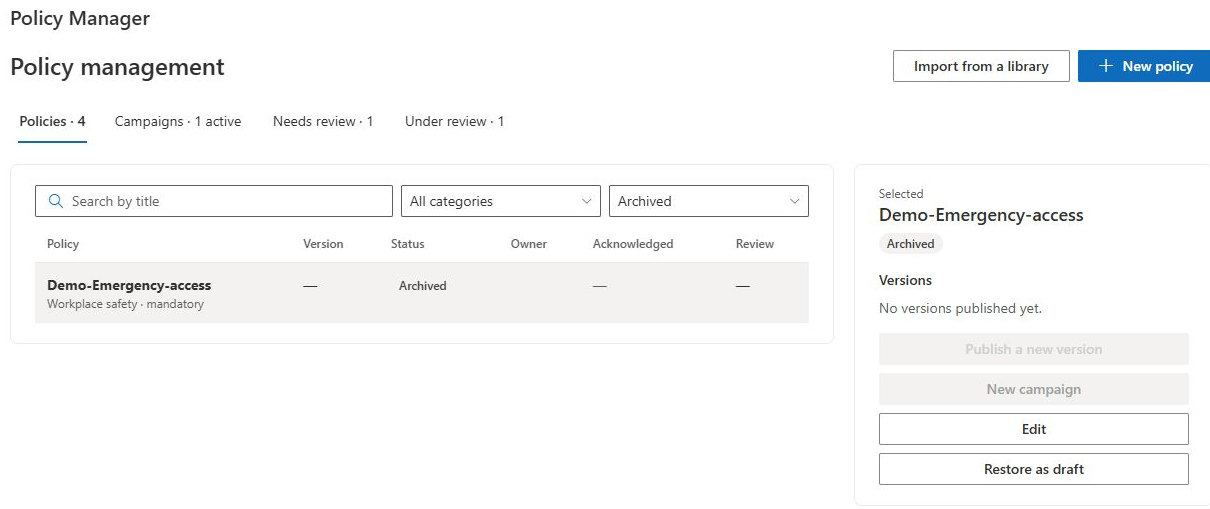
- Select Archive. The action applies the state change directly; the current interface does not provide a separate confirmation workflow.
- Change the policy status filter to Archived or All statuses if the card disappears from the default view.
- Verify the archived state and inspect the policy in the library and management pages.
The library loads published and under-review policies, so archived cards are no longer part of that catalogue. Publication and new-campaign actions on the archived card are disabled. These UI effects do not erase its version history.
Check campaigns and assignments separately
Archiving changes the policy status; it does not automatically stop campaigns, mark assignments cancelled or delete acknowledgements. Stopping a campaign is itself a separate action with its own limits, described in KB10523. How to Monitor and Stop Policy Campaigns.
My Policies is assignment-based, and a direct reader link can still load a policy by its identifier. Consequently, an old assignment may remain visible or reachable after archival. Reporting views may also continue to include assignment rows even when the policy no longer appears in a published-policy matrix. Verify the actual employee and reporting behavior instead of using archive as an access-control boundary.
❗ Important
Do not remove underlying lists, evidence records or source files as a shortcut for resolving outstanding assignments. Archive is a lifecycle label, not a complete withdrawal workflow. If your organization requires withdrawal or retention guarantees beyond the current controls, agree a supported procedure before making the content unavailable.
Restore the card as a draft
Select the archived policy and choose Restore as draft. Confirm that its status becomes draft, then adjust the filter to find it. Restoration does not clear the current version, remove previous campaigns or reset historical evidence. The card should therefore be reviewed as an existing policy, not treated as an entirely new blank item.
Inspect the owner, source, reading controls, dates and history. Publish an appropriate new version before normal redistribution, then configure the intended campaign. Because an old current-version value can remain, do not infer readiness solely from whether a campaign action appears available on the restored card.
Verify the completed change
Check the policy state, library visibility and a representative employee assignment. Confirm that retained history is still available to authorized users and that the replacement or restored policy has the intended publication and distribution path. Use KB10515. How to Inspect Policy Version History and Document Snapshots for historical inspection and KB10514. How to Publish a New Policy Version and Request Acknowledgement Again for republication.