Policy Acknowledgement
Automatic audience updates, scheduled reminders and escalations require the separate Policy Acknowledgement service component. Policy Admin stores connection and notification settings and can ask the service about consent. Those controls do not deploy the service or prove that every background job is operational.
Obtain the service prerequisites
Use a product-administrator account and obtain the service endpoint and deployment instructions from the organization or provider responsible for that component. Do not treat a sample address in a field as a provisioned tenant endpoint. Confirm who manages service availability, application permissions and delivery troubleshooting.
SPFx API permission approval and service administrator consent are different steps. Complete the product's installation requirements first. If the service has not been supplied or tested, document that scheduled behavior is not available rather than describing stored campaign settings as an active automation.
Connect and check consent
- Open Policy Admin and select Notifications.
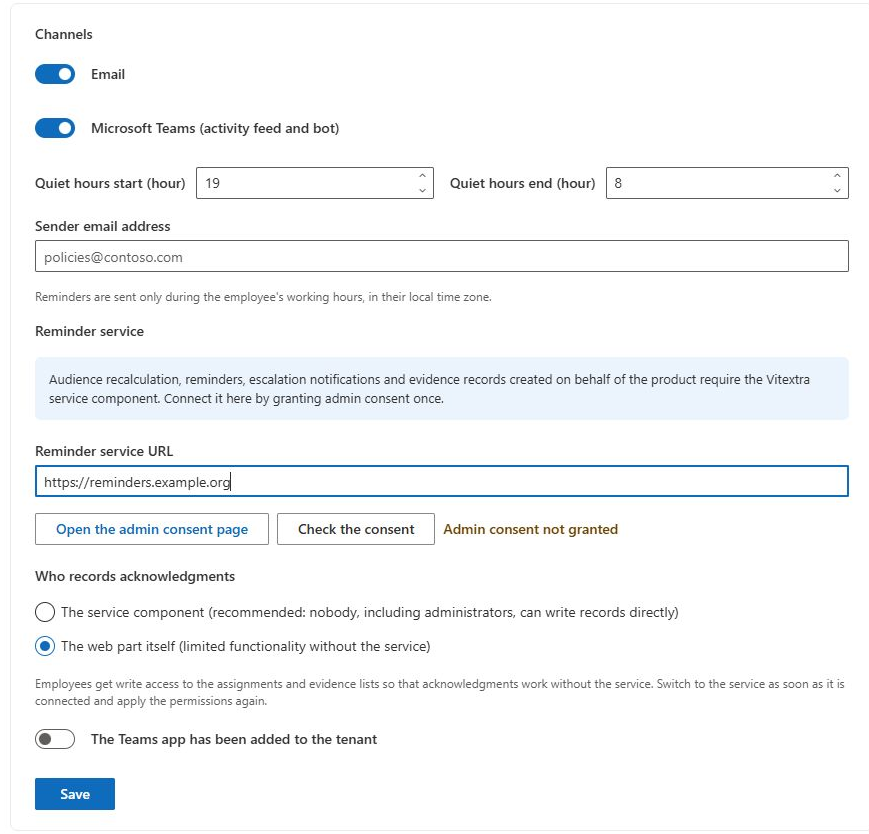
- Enter Reminder service URL with the issued service URL.
- Select Open the admin consent page and complete the tenant's consent process with an authorized administrator.
- Return and select Check the consent.
- Review the result and save the settings.
The client opens the service's /consent route with the tenant identifier and requests /api/status for its status. It expects a positive consentGranted response and can store a reported lastRun. These are integration expectations visible in the client, not documentation of a verified server implementation.
Configure channels and schedules
Review Email, Microsoft Teams (activity feed and bot), Quiet hours start (hour), Quiet hours end (hour) and Sender email address. Hours use a 0 to 23 range; the intended quiet-hours behavior depends on the service. Verify its time-zone handling rather than assuming the browser setting implements delivery suppression itself.
For each campaign, review assignment-time notification, days before the deadline, due-date notification, repeated overdue reminders and escalation thresholds. The web parts store those values. Actual timing, repeat suppression and escalation recipients must be checked against the service that runs them.
If Teams delivery is needed, deploy the required app and verify the delivery component. The The Teams app has been added to the tenant switch is a stored flag, not an installation action or proof that a bot exists. See KB10511. How to Add My Policies to Microsoft Teams. Manual Team Compliance emails are separate and do not follow these service switches; see KB10524. How to Send Manual Policy Reminders to Your Team.
Choose how acknowledgements are recorded
Set Who records acknowledgments independently from channel configuration. When switching to Service mode, confirm that the service can record a pilot acknowledgement, then reapply role permissions from Roles using Save and apply permissions. Saving the mode alone does not synchronize permissions. Review KB10509. Policy Acknowledgement Data Storage: Direct and Service Modes before relying on the protection model.
Separate configuration evidence from operational evidence
The client can show that settings were saved and that the status endpoint returned a response. Those observations answer narrower questions than “the service works.” Agree with the service owner which jobs are deployed, which accounts or application permissions they use, and where a failed run can be diagnosed. The web-part interface does not provide all of those server-side details.
| Observation | What it supports | What still needs testing |
|---|---|---|
| Endpoint saved | The client has an address to call. | Availability, authentication and the requested operation. |
| Consent reported as granted | The status response reports consent. | Successful writing and execution of required jobs. |
| Last-run value displayed | The service supplied a run-related value. | Which job ran, which campaign it processed and its outcome. |
| Notification preference enabled | The requested channel is configured. | Actual delivery to the intended recipient. |
| Assignment created | Employee work exists in the hub. | Whether a notification was sent and received. |
Keep a small acceptance record for each required feature. For instance, an employee receipt tests the acknowledgement path, while a scheduled reminder tests a different operation. A success in one path should not be used to sign off another without evidence.
Test a later audience change deliberately
For an always-on scenario, first complete and verify the initial launch. Then arrange a controlled membership change for an eligible test employee and ask the service owner to identify the processing run that should detect it. Check the created assignment's policy version, account and deadline, and inspect whether an existing same-version assignment should prevent duplication.
This is a deployment acceptance procedure, not a claim that the client runs a membership scheduler. If no assignment appears, distinguish “the job did not run” from “the user was excluded” and “a duplicate was correctly skipped.” Inspect the relevant data before repeatedly recreating the campaign.
Use the same approach for notifications: document the expected channel, recipient and schedule, then compare service execution and delivery results. Manual reminders sent from a user's mailbox are a separate path and cannot prove that the automatic notification configuration is functioning.
Run acceptance checks
Test a small campaign with known recipients. Verify an initial assignment, a scheduled reminder, a controlled audience addition if always-on behavior is needed, and an overdue escalation if used. Record expected time, actual result and the service's reported run information. Test email and Teams separately.
❗ Important
A successful consent check does not prove scheduler health, message delivery or evidence protection. A missing or old last-run value also needs interpretation by the service owner. The separate server implementation was not available in the web-part project, so its permissions, scheduling and failure recovery must be verified in the deployment.
If checks fail, preserve the configuration and error details and contact the service owner. Do not repeatedly change consent, recording mode or permissions without identifying the failed operation. Use KB10538. Troubleshooting Failed Acknowledgements and Missing Notifications to separate recording failures from notification failures.