Policy Acknowledgement
If you need clarification, use the question action in Policy Reader. If you cannot truthfully accept the acknowledgement statement, use the inability-to-acknowledge action and explain why. These actions serve different purposes and have different effects on your assignment.
Choose the appropriate action
| Situation | Action | Assignment effect |
|---|---|---|
| You need an explanation but have not declared that you cannot confirm. | Ask the owner a question | Records a question without automatically changing the assignment status. |
| You cannot accept the statement and need a decision or exception. | I cannot acknowledge — give a reason | Records the reason and changes the assignment to review-required status. |
Do not use the normal confirmation checkbox merely to clear a deadline when you cannot confirm the statement. Conversely, an ordinary question does not automatically pause the deadline or suspend reminders.
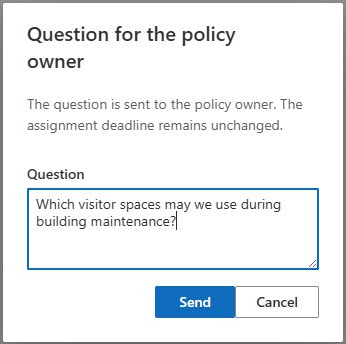
Submit a question
- Open your assignment from My Policies.
- Read the policy, version and acknowledgement statement so that you can identify the point needing clarification.
- Select Ask the owner a question.
- Enter a clear, nonempty message in Question and select Send.
- Wait for the sent confirmation before closing the dialog.
Include the relevant section or wording and the question you need answered. Avoid adding unrelated confidential information. The product already associates the message with your account and policy; you do not need to copy an entire sensitive document into the field.
Report an inability to acknowledge
Open the assignment and select I cannot acknowledge — give a reason. Enter your reason in Reason, send it and wait for the result. The product stores a case and changes the assignment to Needs review, retaining the reason in its comment.
After this change, the ordinary acknowledgement panel is replaced by review information. The assignment remains visible among pending work in My Policies, but normal confirmation is blocked until the issue is resolved or the assignment is reopened. This is not the same as an exemption.
Understand what happens next
Authorized users handle open questions in Policy Manager. They can save an answer; for an inability case they can reopen the assignment, and authorized exemption decision-makers can record an exemption with a reason. Reopening does not extend the original due date. See KB10507. How to Handle Policy Questions and Exempt Employees for the management procedure.
Saving an answer does not, by itself, reopen a review-required assignment. The current response action stores the answer in the question record; the employee reader does not provide a complete conversation inbox, and automatic answer email is not established by that action. Use your organization's agreed follow-up channel if you need the decision explained.
📝 Note
The question and assignment updates are separate operations. If submission reports an error, the question may already have been created even though the status update failed. Ask the owner to check the queue before sending the same reason repeatedly.
Write a message the owner can act on
Identify the part of the policy that needs attention and explain how it affects your ability to confirm. Include the relevant section heading or a short description rather than copying sensitive material unnecessarily. Check the policy version in the reader so that the owner can distinguish a question about the current release from one about earlier wording.
For a clarification, explain the ambiguous instruction and the decision you need. For an inability to acknowledge, describe the actual obstacle: for example, a required procedure may not apply to your role, or a statement may conflict with the work you have been assigned. These are examples of useful context, not automatic grounds for an exemption.
If the problem is technical, state whether the source opens in a separate window, which reading condition remains incomplete and what error is shown. This helps the owner route a document-access issue differently from a question about the policy's meaning. A technical question does not require you to claim agreement with content you cannot read.
Know what to expect after sending
| Owner action | What it means for you |
|---|---|
| Saves an answer | A response is recorded; a blocked assignment is not automatically reopened. |
| Reopens the assignment | Reload the personal page and review the task again; the original deadline remains. |
| Records an exemption | The assignment is exempted, not acknowledged on your behalf. |
| Revises the policy | Check which version and assignment the owner asks you to use next. |
The current client does not provide a complete employee conversation inbox or guarantee an email when an answer is saved. Follow the organization's usual communication route if you need to learn the decision. Do not assume that the disappearance of an open case from the owner's queue means you have received the response.
Avoid repeatedly submitting the same message just because the assignment has not immediately changed. Reload the task, inspect its state and contact the responsible owner with the existing context. If submission itself failed, retain the error and time so that an administrator can check whether a question record or state change was partially saved.
Verify the outcome
Reload My Policies and check the assignment status after a decision. If reopened, read the clarification and complete the remaining conditions only if you can now confirm. If exempted, check the exemption view. If the expected action is missing, verify that you opened an active personal assignment rather than a receipt, exempt item or unassigned catalogue policy.