Document Auto Title
 This article describes how to automatically populate the Title column with the file name when a document is uploaded or edited.
Introduction
The Vitextra Document Auto Title product automatically populates the Title field in a SharePoint document library.
📝 Note
Auto-population can be enabled only for a document library.
Prerequisites
To use auto-population in a document library, activate the Vitextra: Document Auto Title site feature. Go to Site Settings → Manage site features and click Activate next to the feature:

Activate Auto-Population
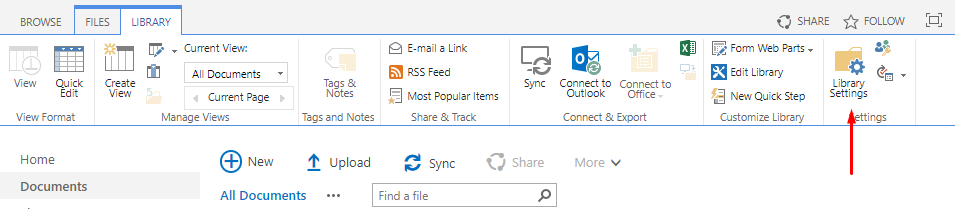
Open the document library and go to Library → Settings:
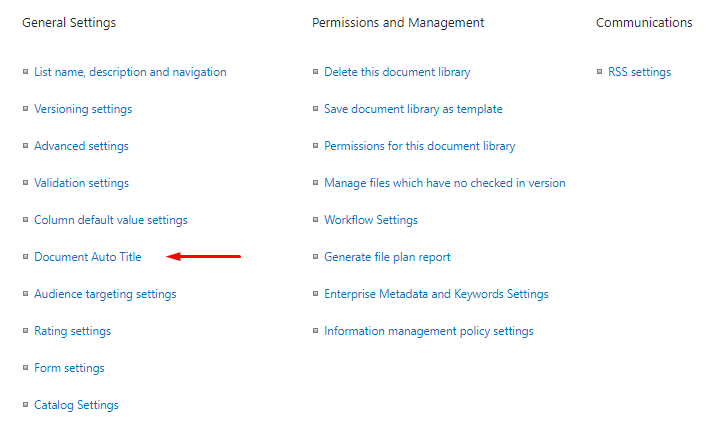
Click Document Auto Title under the General Settings heading:
Settings
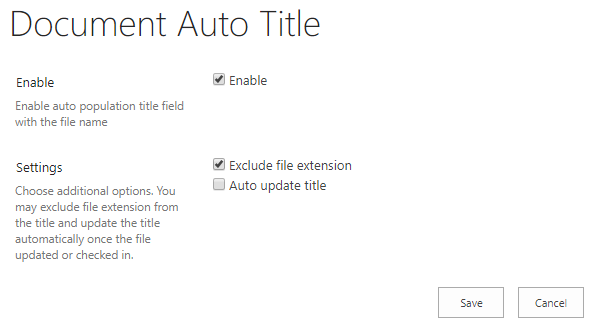
Select Enable to turn on auto-population. You can also choose additional options, such as excluding the file extension and updating the Title column when a document is edited:
📝 Note
Document Auto Title is based on SharePoint event receivers and doesn't rely on the workflow engine. This improves performance and avoids creating unnecessary artifacts such as workflow tasks and history list items.
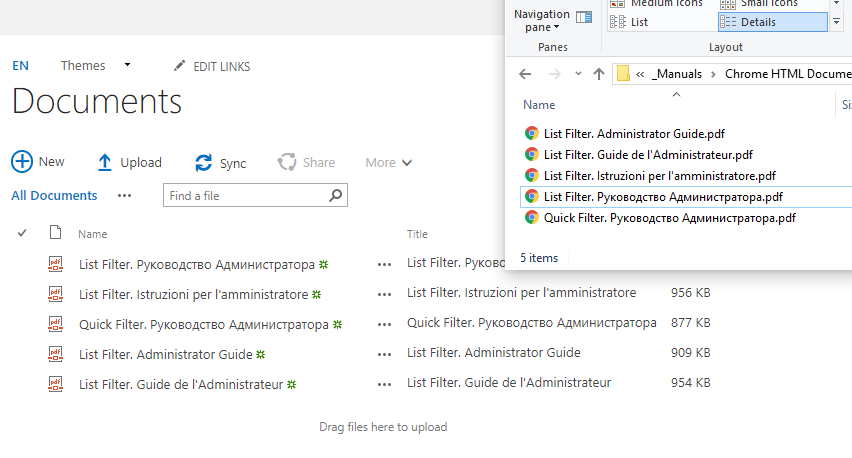
When Document Auto Title is enabled, the Title column is populated automatically as soon as a document is uploaded: