Deze content is niet beschikbaar in jouw taal.

The Vitextra List Filter web part for SharePoint lets you export list data to a Microsoft Excel file. The export always includes the complete list, no matter how many items it contains.

Prerequisites

Before you can export, activate the Vitextra: List Filter site collection feature and add the List Filter web part to the list view or the page where the list is displayed.

For details, see the Configure List Filter article.

Export Feature

To show the Export button, click Settings on the filter panel, select Excel under the Export heading, and click Save:
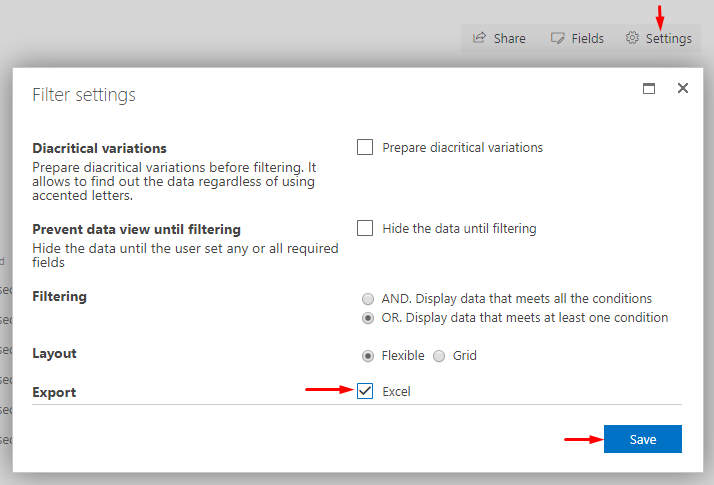
SharePoint List Filter settings dialog

SharePoint List Filter settings dialog

Export List Data

To export the list data to Excel, click Export on the filter panel:
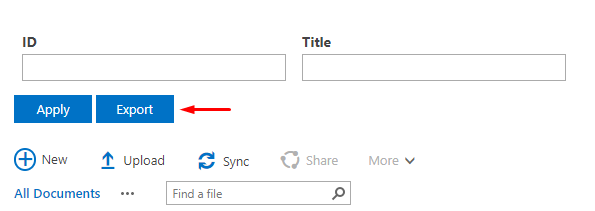
Export button

Export button

The exported file contains the same columns as the current view:
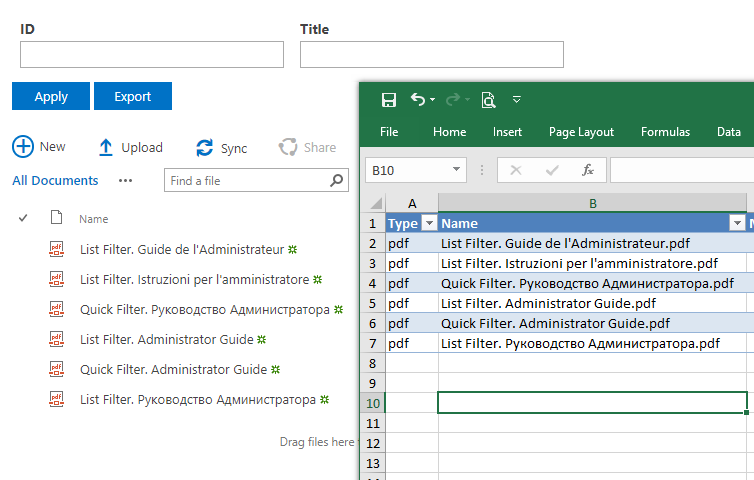
Exported Data

Exported Data

📝 Note
Vitextra List Filter exports data according to the view settings, the user's permissions, and any filters currently applied.


Vragen en antwoorden

Stel een vraag over dit artikel en ontvang een officieel antwoord van ons team.

Er zijn nog geen vragen. Stel de eerste vraag.

Uitgelichte artikelen

Vragen maken, bewerken en publiceren in Questions and Answers

Lees hoe redacteuren inhoud beheren in Vitextra Questions and Answers: SharePoint-lijstkolommen, antwoorden met Markdown, concepten, publicatie, volgorde, bijlagen en bulksgewijs bewerken.

5 min
Vereiste Microsoft Graph-machtigingen voor Employee Directory

Welke Microsoft Graph-machtigingen Vitextra Employee Directory aanvraagt, waarvoor Directory.Read.All, User.Read.All, Presence.Read.All, Calendars.Read en People.Read dienen, welke webonderdelen ze nodig hebben, wat ontbrekende goedkeuring betekent en hoe u de machtigingen in het SharePoint-beheercentrum goedkeurt en controleert.

2 8 min
Organizational Chart toevoegen aan Microsoft Teams

Voeg Vitextra Organizational Chart toe aan Teams: synchroniseer het pakket vanuit de SharePoint-appcatalogus, voeg een persoonlijke app of kanaaltabblad toe en sla standaardinstellingen voor de hele tenant op.

5 min

Delen